Voiceover
Write a script or have it written from a brief, pick the language, a native voice, a quality and a pace, then record the take.
Voiceover is the first page of Voice and Music. It turns a script into a recording in the voice you pick and files it in the Assets Library as an MP3.
The script
Write the words the way they should be spoken: numbers, dates and abbreviations as they are said. Under the editor, the page counts the characters, estimates how long the take will run and shows its price. A long script is recorded in parts and joined into one take, so there is no length to watch, up to 100,000 characters.
When the model reads expression tags (Balanced and Best), a row of tags shows above the editor: whispers, laughs, sighs, excited, curious, sarcastic, serious, cheerfully, pause. Click one to put it where the cursor is, such as [whispers] before a line said softly. A model that does not read tags leaves them out instead of saying them.
Write the script for me
Open Write the script for me, write a brief, give a length in seconds and pick a tone. The script is written in the brand’s voice, following its guidelines, and fills the editor. You can then change any word. Its price shows next to the result.
Language and voice
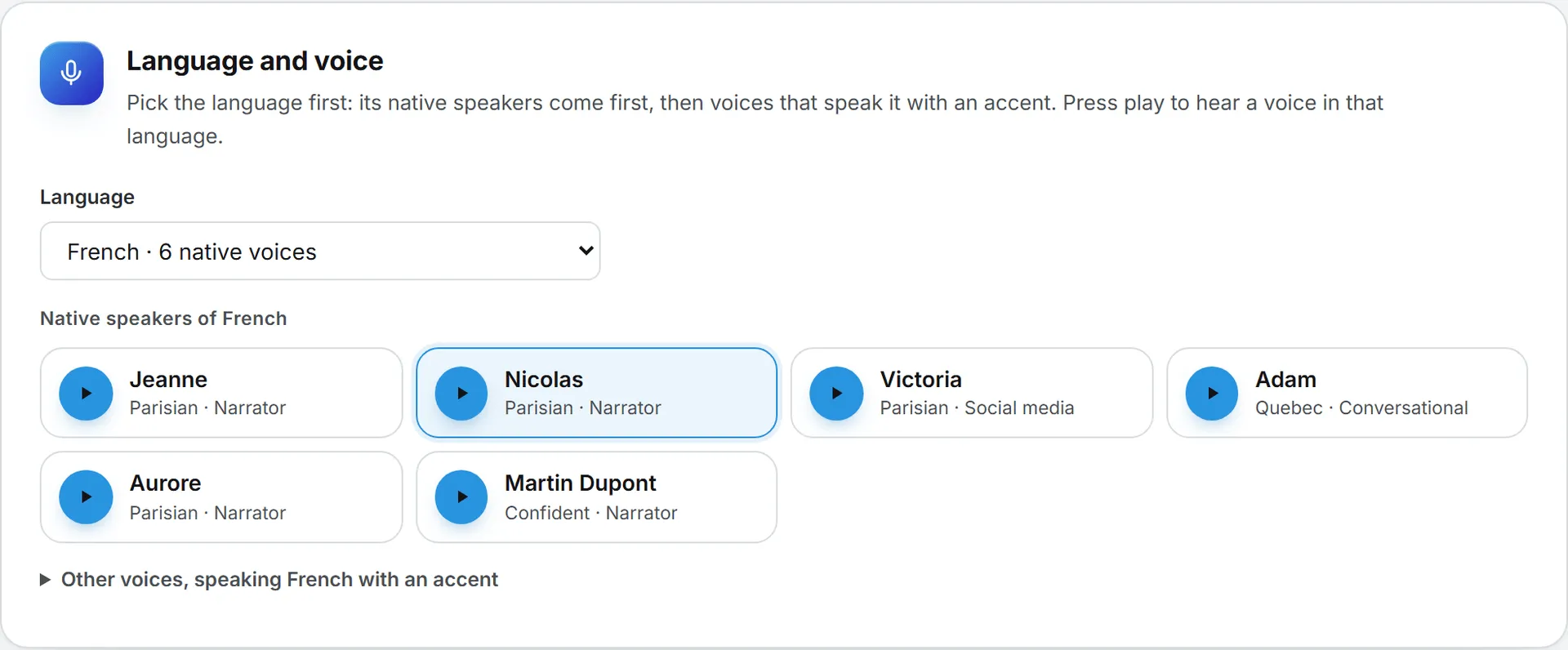
Pick the Language first. The list offers every language at least one model your organization allows can speak, more than 60 of them, and English is the default. A language with voices of its own says how many, such as “French · 6 native voices”.
Then pick the voice. The native speakers of the language come first: more than 200 voices across 50 languages, each one tested before it was offered: a sentence recorded in its voice, then transcribed back to confirm the language heard. Each tile shows its accent or character and what it is made for, such as “Parisian · Narrator”. Below them, the fold Other voices, speaking French with an accent (it names the language you picked) holds the standard voices, such as George, Alice or Brian: English speakers who speak any language with their own accent. A few languages have no native voice yet (Estonian, Latvian, Lithuanian, Slovenian, Icelandic, Welsh, Armenian, Belarusian, Bosnian, Macedonian, Irish and Luxembourgish): the page says so and shows the standard voices.
Every voice has a play button: it plays the voice speaking the language you picked. Samples are free. Click a voice to pick it.
Changing the language moves the voice to a native speaker of the same gender when there is one. A voice set by the brand’s sonic kit, or by Use these settings again in History, is kept.
Quality and pace
- Quick is the cheapest and the fastest, good for drafts.
- Balanced is more expressive and reads expression tags.
- Best gives the most natural delivery.
- All models lists every model your organization allows that speaks the language, with its price per 1,000 characters.
Only the models that speak the language picked are offered: Flash v2 speaks English only, Multilingual v2 speaks 29 languages, Flash v2.5 speaks 32, and the v3 and v4 models more than 70. The page opens on the cheapest of them. Pace goes from slower to faster.
The brand picked at the top right fills the language, the voice, the quality and the pace from its sonic brand kit, and its pronunciations are applied to the script. You can still change any of them for one take.
Record
Click Record the voiceover. The take lands on top of the list under the button, with its player, its length and its price, Download and Open in library. It also appears in History.