Agent catalog
The catalog lists the six standard agents you can add to your organization or your own agents, and the tailor-made agents BearingBridge builds on request.
The agent catalog lists every agent you can use. Standard agents are ready to add to your organization or to your own agents. Tailor-made agents are built by BearingBridge on request. To open it, click Agents in the header, then the Catalog tab.
Standard agents
Standard agents come with the app. Each reads a fixed set of data on a schedule, and none of them runs until it is added: an admin adds it to the organization, or you add it to your personal agents.
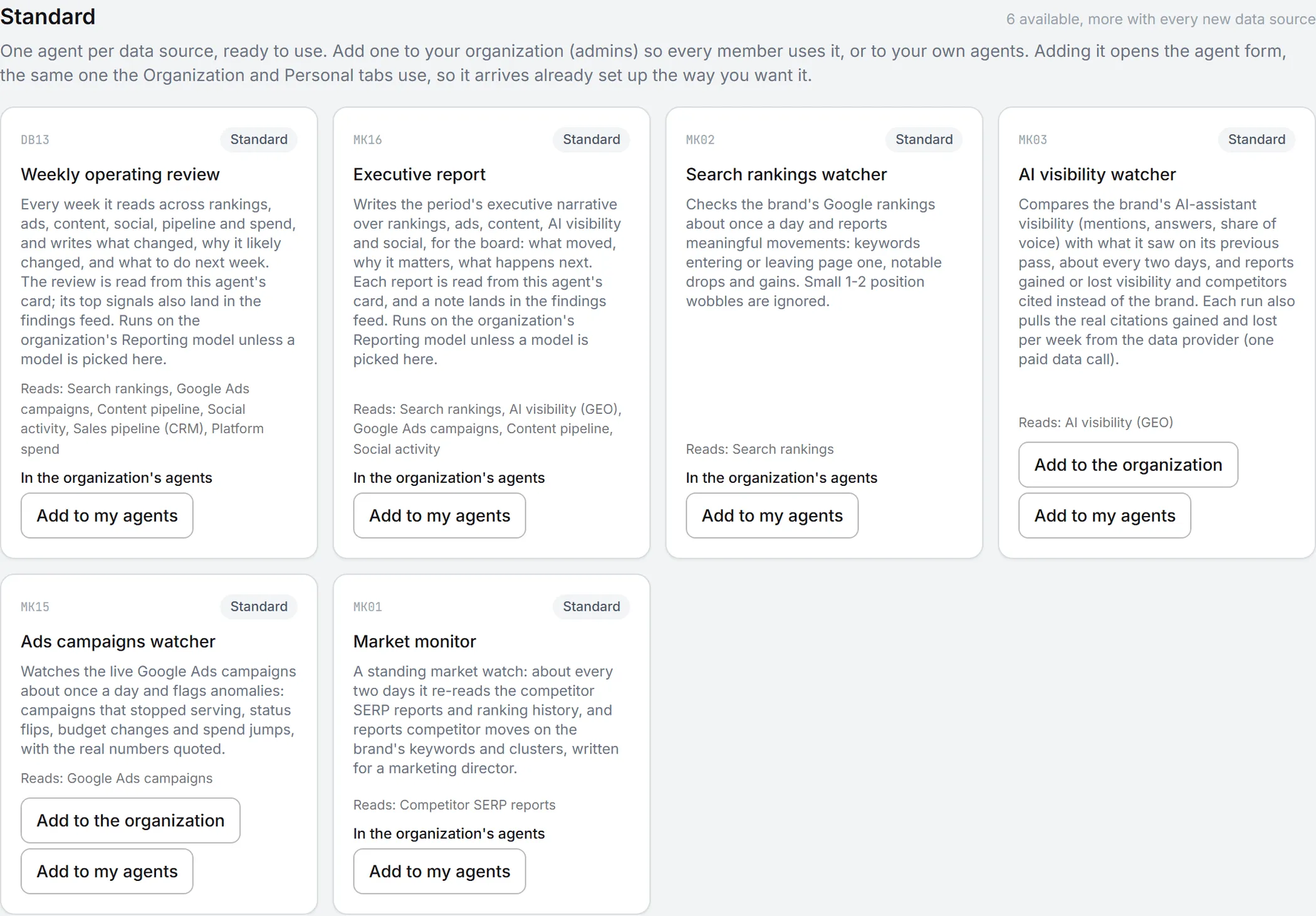
Each card shows the agent’s catalog code, its name, what it does, and the data it reads, on a Reads: line. The code, such as MK02, is the agent’s reference in the BearingBridge catalog, and its findings carry it too. The six standard agents follow, with their default schedules. You can change a schedule once the agent is added.
Report agents
Both write a document every time they run. You read it on the agent’s card, and its main signals land in the findings feed as well. When a run covers a single brand, the report follows that brand’s guidelines. Unless you pick a model for them, both use the model your organization set for Ask Intelligence.
The Weekly operating review (DB13) runs every 168 hours by default. It reads Search rankings, Google Ads campaigns, Content pipeline, Social activity, Sales pipeline (CRM) and Platform spend, then writes up what changed and why it likely changed. It ends with three to five actions for next week. It runs for a brand that has at least one of these modules on: Google Search (SEO), Google Ads, Market Monitor or Content Plan.
The Executive report (MK16) runs every 720 hours, about once a month. It reads Search rankings, AI visibility (GEO), Google Ads campaigns, Content pipeline and Social activity, and writes the period’s narrative for leadership: a short executive summary and a section per channel with real numbers, closing on what happens next. It runs for a brand with Google Search (SEO), Google Ads, Content Plan or AI Search on.
Watchers
Watchers write findings, short alerts your team can act on. AI agents explains how findings work.
| Agent | What it does | Brand module needed | Default schedule |
|---|---|---|---|
| Search rankings watcher (MK02) | Reports meaningful Google ranking moves: keywords entering or leaving page one, drops of three positions or more, newly ranked or lost keywords. Moves of one or two positions are ignored. | Google Search (SEO) | Every 20 hours |
| AI visibility watcher (MK03) | Compares the brand’s visibility in AI assistants with its previous pass and reports gained or lost visibility, and competitors cited instead of the brand. | AI Search | Every 44 hours |
| Ads campaigns watcher (MK15) | Flags anomalies in the live Google Ads campaigns: campaigns that stopped serving, status flips, budget changes, spend and cost-per-click jumps, with the real numbers. | Google Ads | Every 20 hours |
| Market monitor (MK01) | Re-reads the competitor search reports and ranking history, and reports competitor moves on the brand’s keywords, written for a marketing director. | Market Monitor | Every 44 hours |
One thing to know about the AI visibility watcher: each run makes one paid data call to fetch the citations the brand gained and lost per week. Every watcher runs on Claude Haiku 4.5 unless you pick another model.
New standard agents
From time to time the BearingBridge team adds a new standard agent to the app. It shows up in the catalog like the others and is opt-in too. Once added to your lists, its card carries the badge Standard · added by the platform.
Adding a standard agent
Once you’ve found the agent you want, adding it is quick. What you can click on a card depends on your role.
| Button | Who sees it | What happens |
|---|---|---|
| Add to the organization | Admins | The agent joins the organization’s agents and runs on every brand of the organization whose module is on. |
| Add to my agents | Admins, and editors or brand managers once the organization has the agent | The agent joins your personal agents. It applies to the runs you start yourself. |
| Ask your admin to add it | Members who aren’t admins, while the organization doesn’t have the agent | Sends one email to every admin of your organization, describing the agent and linking to the catalog, with you as the reply-to address. The button changes to Request sent to your admin. |
Viewers can’t add agents. They can still ask an admin for one.
Once an agent is added, the button turns into a link: In the organization’s agents or In my agents.
To add an agent:
- Click Add to the organization or Add to my agents on its card.
- A form opens, filled with the agent’s standard setup. It’s the same form used everywhere else in the Agents area: Name, Model, the data it reads, What users are told it does, Instructions (the brief the agent reasons with), Runs every (hours), Monthly budget (USD), Weekly budget (USD), Who hears about a run and What the mail carries.
- Change what you need. Leave a field empty to keep the standard version.
- Click Add the agent.
The agent is added switched on. Everything stays editable afterward from the Organization or Personal tab. That’s also where you test it on real data and choose whether it reads several brands in one run. See organization and personal agents.
The data a standard agent reads is shown in the form but can’t be changed. To choose the data yourself, build a custom agent.
Tip: Not sure an agent is worth it? Add it to your own agents first and test it on a real brand. The test shows what it would report and what it costs, and posts nothing to the brand’s feed.
Tailor-made agents
The rest of the page is a reference list. Skim the headings for your area.
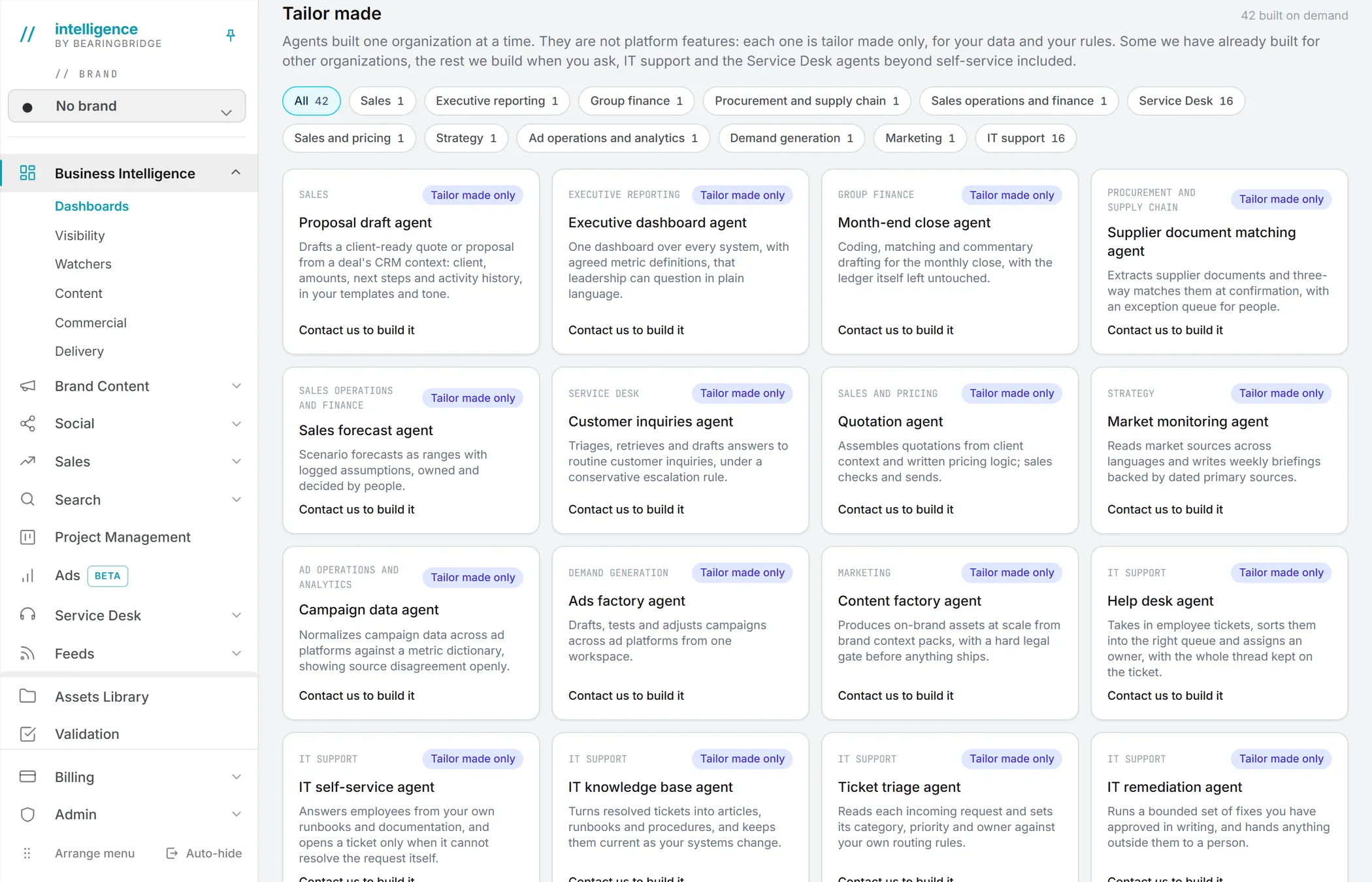
Tailor-made agents aren’t platform features. Each one is built for one organization, on its own data and rules. Some already run for other organizations; the rest get built when someone asks. That’s also how internal IT support is handled, along with every Service Desk agent beyond the self-service assistant.
In the catalog they sit in the Tailor made section, each card marked Tailor made only. Use the category chips above the grid to show one area at a time, or All. Each chip shows how many agents it holds. Each card has a Contact us to build it link that opens the contact form with the request filled in. The app shows no price for these agents. The contact form is where the conversation starts.
Sales, finance and operations
| Agent | Area | What it does |
|---|---|---|
| Proposal draft agent | Sales | Drafts a client-ready quote or proposal from a deal’s CRM context: client, amounts, next steps and activity history, in your templates and tone. |
| Quotation agent | Sales and pricing | Assembles quotations from client context and written pricing logic; sales checks and sends. |
| Sales forecast agent | Sales operations and finance | Scenario forecasts as ranges with logged assumptions, owned and decided by people. |
| Month-end close agent | Group finance | Coding, matching and commentary drafting for the monthly close, with the ledger itself left untouched. |
| Supplier document matching agent | Procurement and supply chain | Extracts supplier documents and three-way matches them at confirmation, with an exception queue for people. |
| Executive dashboard agent | Executive reporting | One dashboard over every system, with agreed metric definitions, that leadership can question in plain language. |
Marketing and strategy
The Market monitoring agent (Strategy) reads market sources across languages and writes weekly briefings backed by dated primary sources. The Campaign data agent (Ad operations and analytics) normalizes campaign data across ad platforms against a metric dictionary and shows where sources disagree. The Ads factory agent (Demand generation) drafts, tests and adjusts campaigns across ad platforms from one workspace. The Content factory agent (Marketing) produces on-brand assets at scale from brand context packs, with a hard legal gate before anything ships.
Service Desk
These run on your own channels, helpdesk and order systems.
| Agent | What it does |
|---|---|
| Customer inquiries agent | Triages, retrieves and drafts answers to routine customer inquiries, under a conservative escalation rule. |
| Omnichannel inbox agent | Brings email, chat, voice, messaging apps and social into one queue, with the same customer recognized across all of them. |
| Response drafting agent | Drafts the reply from your own history and tone of voice; the person handling the case decides what goes out. |
| Response library agent | Keeps macros, templates and snippets in one place and offers the right one inside the conversation. |
| Order and account lookup agent | Puts the customer’s orders, account and past contacts in front of the person answering. |
| Warranty and returns agent | Carries a warranty, return or claim from request to resolution, with the exceptions queued for a person. |
| Service SLA agent | Watches targets and timers per conversation and escalates on your own paths before a promise is broken. |
| CSAT agent | Asks after contact, collects the answers and shows what moved satisfaction, not just the average. |
| Service QA agent | Reviews interactions against your quality grid and shows each score with the passage it came from. |
| Coaching agent | Turns quality reviews into coaching for each person, with examples from their own conversations. |
| Customer health agent | Builds an account-level service picture: volume, sentiment, open issues and where the relationship stands. |
| Multilingual service agent | Handles inbound and outbound in the customer’s own language, written natively rather than translated. |
| Voice of the customer agent | Reads what customers say across every channel and reports the themes with the quotes behind them. |
| Proactive outbound agent | Contacts the customer before they complain, on the signals you decide are worth a message. |
| Complaint handling agent | Tracks serious cases from first contact to closure, with deadlines, owners and the record a regulator would ask for. |
| Service report agent | Reports volume, resolution, cost and quality in one place, on definitions everyone has agreed. |
The self-service assistant itself ships in the app. See the Service Desk.
IT support
Sixteen agents for internal IT, built against your own tools and rules.
| Agent | What it does |
|---|---|
| Help desk agent | Takes in employee tickets, sorts them into the right queue and assigns an owner, with the whole thread kept on the ticket. |
| IT self-service agent | Answers employees from your own runbooks and documentation, and opens a ticket only when it can’t resolve the request. |
| IT knowledge base agent | Turns resolved tickets into articles, runbooks and procedures, and keeps them current as your systems change. |
| Ticket triage agent | Reads each incoming request and sets its category, priority and owner against your own routing rules. |
| IT remediation agent | Runs a bounded set of fixes you have approved in writing, and hands anything outside them to a person. |
| Access request agent | Carries an access request from ask to approval, provisioning and revocation, with every step recorded. |
| Joiner, mover, leaver agent | Runs the onboarding and offboarding runbook for each arrival, move and departure, and checks nothing was left open. |
| IT asset agent | Keeps devices, their owners and their lifecycle in one inventory, and flags what has gone missing or out of date. |
| Software license agent | Tracks seats, cost and real usage across your tools, and shows what can be given back at renewal. |
| Infrastructure monitoring agent | Watches servers, services and availability, and reports what changed in plain language instead of raw alerts. |
| Incident management agent | Declares an incident, keeps the timeline and the people on it coordinated, and records how it was resolved. |
| Patch and vulnerability agent | Says what is exposed, what is already fixed and what is still waiting, against your own risk rules. |
| Change management agent | Takes a change request through risk assessment, approval and record, with the evidence attached to it. |
| On-call agent | Runs the rotation, the escalation ladder and the handover note, so nothing is dropped between shifts. |
| IT SLA agent | Tracks targets, breaches and trends per service, and warns before a target is missed rather than after. |
| Postmortem agent | Drafts the postmortem from the incident record: what happened, why, and the actions somebody owns. |
Good to know
- Adding an agent costs nothing. Its runs are billed as they happen and each one shows its cost. A watcher run that finds nothing changed is free. Budgets per agent are covered in organization and personal agents.
- The catalog always lists every standard agent. Once you remove one from the Organization or Personal tab, its Add button comes back and you can add it again at any time.
- An added agent only runs on brands that have its module switched on. If none does, its card on the Organization tab says so.
- If the BearingBridge team removes a standard agent from the app, it disappears from the catalog and stops running everywhere.
Roles are explained in roles and rights, and prices in credits and costs.