Preview and create files
Point at a library file with @ to see it beside the conversation. Ask for an Excel, a document, a deck, a picture or sound.
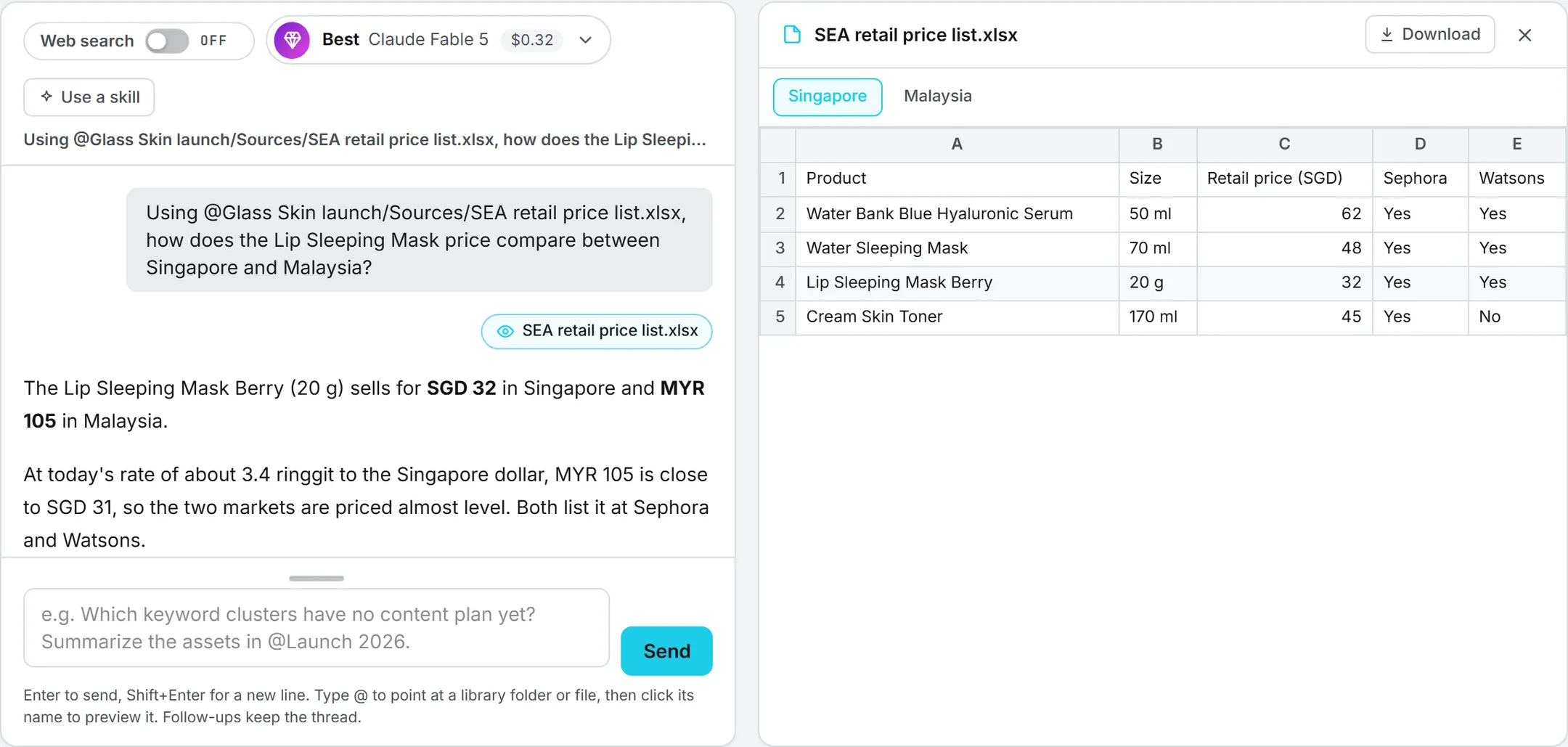
Ask Intelligence reads the files of your Assets Library, and it shows them too. Name a file in your question and you can open it beside the conversation, without leaving the page. Ask can also make files for you: a spreadsheet built from your figures, a document, a slide deck, a picture or a sound.
This is for anyone who works with documents in Ask Intelligence.
Preview a library file
- In the question box, type @ followed by the first letters of the file name, for example
@Budget. A list of matching folders and files opens. - Pick the file with the mouse, or with the arrow keys and Enter. Its name goes into your question, and a small chip with an eye icon appears under the box.
- Click the chip. The file opens in a panel to the right of the conversation. On a phone or a narrow window, the panel opens under the conversation.
Every question you sent keeps the chips of the files it named. Click one, even in a conversation reopened days later, to see the file again. The panel shows one file at a time: clicking another chip replaces it. Click the cross, or press Escape, to close it.
Tip: File names with spaces work too. Type the first word after @, then pick the file from the list.
What the panel shows
| File | How it shows |
|---|---|
| Excel (.xlsx) | A table with row numbers and column letters, one tab per sheet. Percentages show as percentages and long decimals are rounded. |
| CSV, TSV | A table, like a single Excel sheet. |
| Word (.docx) | The text with its headings, lists, tables and pictures. |
| The document, in your browser’s own PDF viewer. | |
| Text, Markdown, JSON, code | The text as written. |
| Pictures, clips, sounds | The picture, or a player for the clip or the sound. |
Anything else, a PowerPoint file for example, shows a short note and the Download button. Download at the top of the panel saves the file to your computer, whatever its kind.
Very large files are cut short. A sheet shows its first 1,000 rows and 60 columns, and a text file its first 200,000 characters. A note under the table says so, and Download gets you the whole file. A file over 15 MB is not shown at all, only offered for download.
Ask for a file
Ask in your own words: “Make an Excel of last quarter’s pipeline by stage”, “Write this summary as a Word document”, “Turn these findings into a five slide deck”, “Export that table as a CSV”. Ask reads the data it needs, builds the file and says in a sentence or two what it holds.
| You ask for | Ask makes |
|---|---|
| A spreadsheet | An Excel file (.xlsx), one sheet or several, with headers on the first row |
| A document | A Word file (.docx) or a PDF |
| A deck | A PowerPoint file (.pptx), one slide per point, with speaker notes when useful |
| An export | A CSV, Markdown, text, HTML or JSON file |
| A picture | A PNG image from your description |
| A voiceover | An MP3 of your script, read by a natural voice |
| Music or a sound effect | An MP3 composed from your description |
The file opens in the panel as soon as the answer arrives, and a chip under the answer opens it again later. Ask makes at most six files in one answer.
Where the files go
Everything Ask makes is kept in your Assets Library, at the top level, under No brand. It’s private: only you see it until you share it with Who sees it, like any other asset of yours. Move it, rename it or add it to a campaign from the library.
Videos
A video takes several minutes to render, longer than an answer waits. When you ask for one, Ask writes the video prompt and puts an Open in the Video studio button under its answer. The button opens Video generation in a new tab with the prompt filled in. You choose the engine, the length and the shape there, see the price, and start the render yourself. Nothing is rendered or charged until you click Generate.
What it costs
Opening a picture, a clip or a sound in the panel costs nothing. Opening a document (Excel, Word, PDF, text) counts as a download of the file, charged like any download from the library.
Making a file costs only the answer itself, at the price shown under it. A picture, a voiceover or music is also charged for the render, at the same price as in Image generation or Voice and Music. That charge appears in your usage log as its own line (for example “Ask Intelligence · image”) and isn’t included in the price under the answer. Files you keep in the library count toward storage. See Credits and costs.
Who can do what
Previewing follows the library: you see only the files you could open there. Making things follows your rights:
| To make | You need the right |
|---|---|
| Files (Excel, Word, PowerPoint, PDF, CSV, text) | Assets |
| Pictures | Content: Image |
| Voiceovers, music and sound effects | Voice and Music |
| Videos (prepared for the studio) | Content: Video |
Without a right, Ask simply doesn’t offer that kind of file. See Roles and rights.
Troubleshooting
No chip appears under the box. The chip appears only for a file picked from the @ list. A name typed by hand isn’t linked to a file: type @ and pick it from the list instead.
“This workbook could not be opened.” The file isn’t a valid .xlsx. Open it in Excel, save it again as .xlsx and upload the new copy. Workbooks made by other tools (Python scripts, online converters) open fine, pictures and charts included: the panel shows their cells.
Ask says it can’t make a file. Check that you have the right listed above. A voiceover or music also needs a voice or music model your administrator has left on.