AI Search (GEO)
The GEO page checks whether AI assistants mention and cite your brand, compares you with competitors, tracks trends, and turns results into a conquest strategy.
The GEO page (generative engine optimization) measures whether AI assistants mention and recommend your brand. It also shows which sources they cite and who they name instead. More buyers now put their questions to these assistants instead of Google. The page covers ChatGPT, Claude, Gemini, Perplexity and Google’s AI Overview, though not every tool covers all five.
The five tabs
Open Search, then GEO. The band at the top has five tabs:
| Tab | Question it answers |
|---|---|
| AI Visibility | How often do AI answers mention your domain next to your competitors, and what does AI search show for a keyword? |
| Ask the AIs | If a buyer asks this question, is your brand in the answer? |
| AI Volume | How often are your tracked keywords used in AI tools, next to their Google volume? |
| Who AI Trusts | Which domains and brands do AI answers cite for your topic? |
| Trends | How have a domain’s AI mentions moved month by month? |
Switching tabs doesn’t reload the page. You can also link straight to one: /search/ai#responses opens Ask the AIs, and #volume, #trust and #trends work the same way.
Every tab reads for the brand picked in the header, and results are saved per brand.
Not every tool asks every assistant:
| Tool | Platforms |
|---|---|
| AI share of voice, Who AI Trusts, Trends | Google AI Overview or ChatGPT |
| AI search results | ChatGPT search, Gemini |
| Ask the AIs | ChatGPT, Claude, Gemini, Perplexity |
Important: On AI Visibility, the Market list reads “United States · EN” or “France · FR”, but only the language applies. The country is always the brand’s first market, set on the Brands page. Ask the AIs is the exception: there the Market list sets both.
AI Visibility
This tab stacks two tools, share of voice on top and AI search results below.
AI share of voice
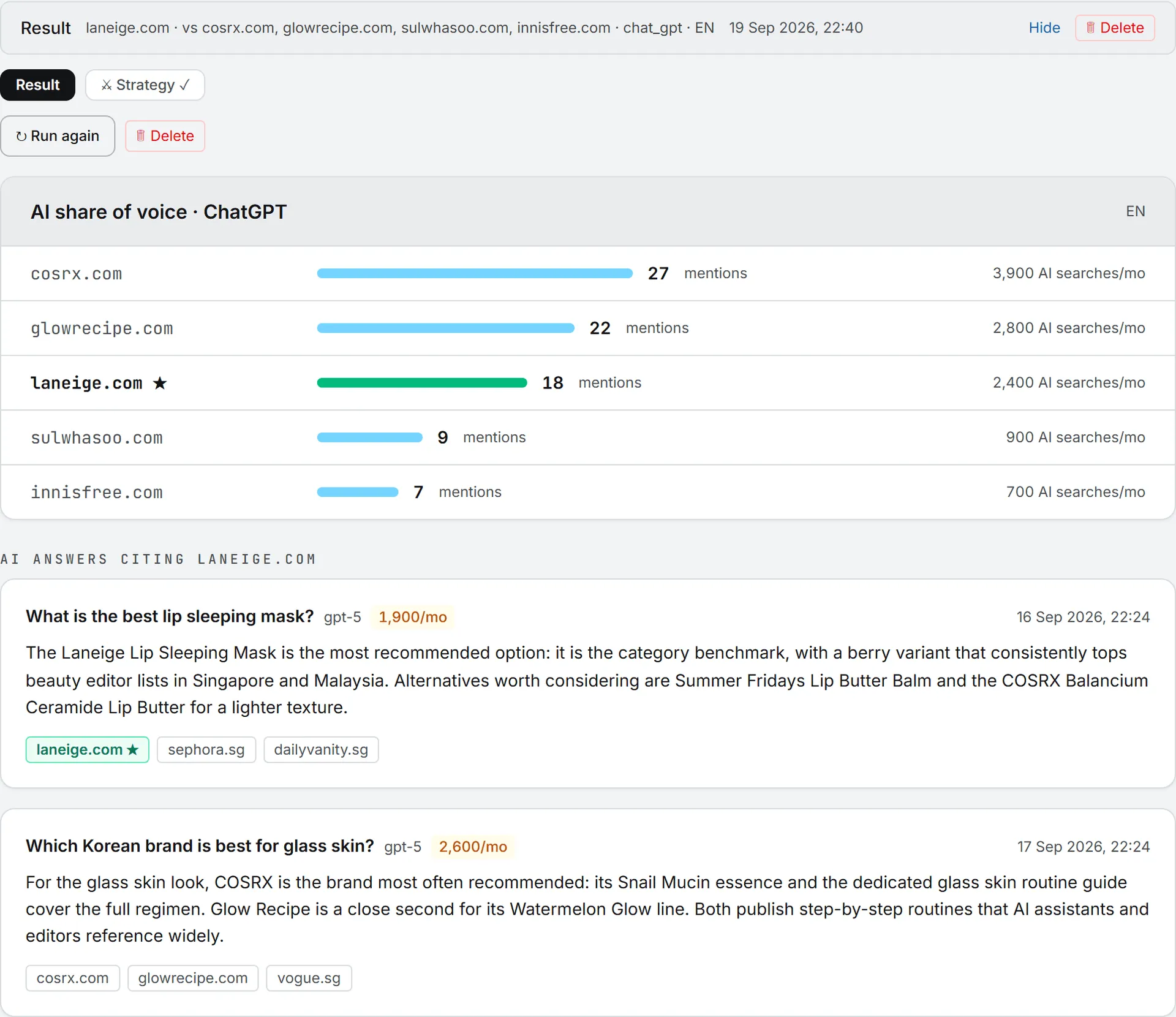
Share of voice counts how often AI answers mention your domain, and each competitor’s.
- Main domain is pre-filled with the brand’s website. You can measure any other domain.
- In Competitor domains, type up to 9 domains separated by commas.
- Pick the AI platform: Google AI Overview or ChatGPT.
- Pick the Market.
- Click 📣 Measure mentions.
The result ranks every domain by mentions, with a bar for each. Your main domain is marked with a star. Some rows also show how many AI searches a month involve that domain.
Below, under AI answers citing [your domain], up to 5 sample answers show the question, the model, its AI search volume, when it was last seen, the answer itself and its sources. Long answers fold; click Show full answer, then Hide full answer.
The run uses one data call for the whole domain set and one for the sample answers.
AI search results for a keyword
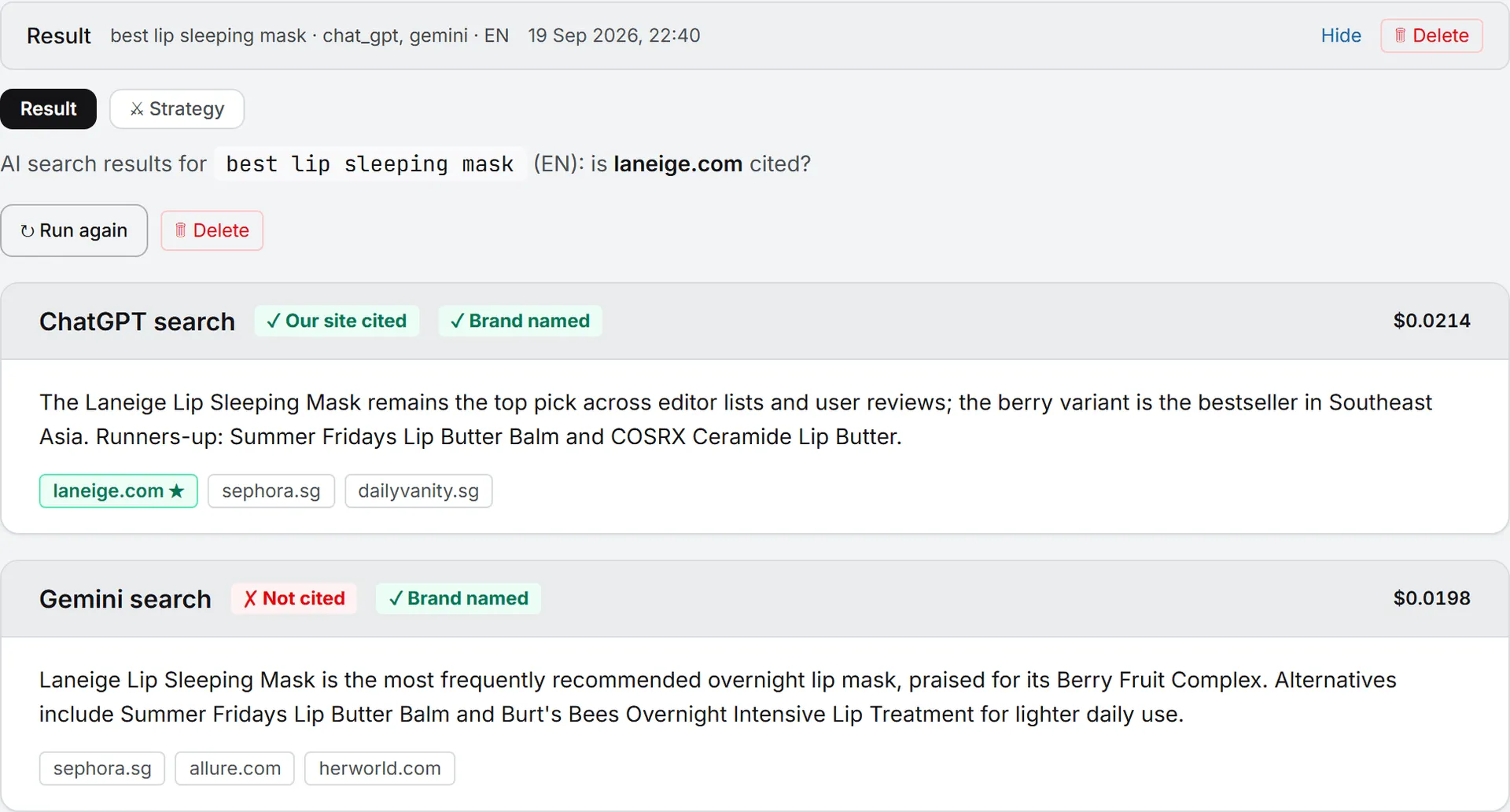
Here you see what ChatGPT search or Gemini actually answers for a keyword, and whether your site made it into the cited sources.
- Type a Keyword.
- Brand terms to detect is pre-filled with the brand name and domain. Add other spellings, separated by commas.
- Tick ChatGPT search, Gemini or both.
- Pick the Market.
- Click 🔎 Get AI results. It can take up to 2 minutes.
Each platform gets its own card with two badges: Our site cited or Not cited (is the brand’s website among the sources?), and Brand named or Brand not named (does the answer text contain one of your brand terms, ignoring case?). The sources are listed under the answer; yours is highlighted with a star. Each card shows its own cost. If one platform fails, its card shows the error and the other card still counts.
Ask the AIs
Put one buyer question to several AI models and read who they recommend.
- Type the Question / prompt, for example “What is the best agency to build a website for a hotel in Lyon?”
- Check Brand terms to detect (pre-filled with the brand name and domain).
- Pick the Market: United States · EN asks for an answer for the US market in English; France · FR asks for the French market in French.
- Tick the models: ChatGPT, Claude, Gemini, Perplexity. ChatGPT and Gemini are ticked by default.
- Click 💬 Ask the AIs.
Tip: Phrase the question the way a buyer would ask it, in a full sentence. To see what AI search shows for a bare keyword, use AI search results on the AI Visibility tab instead.
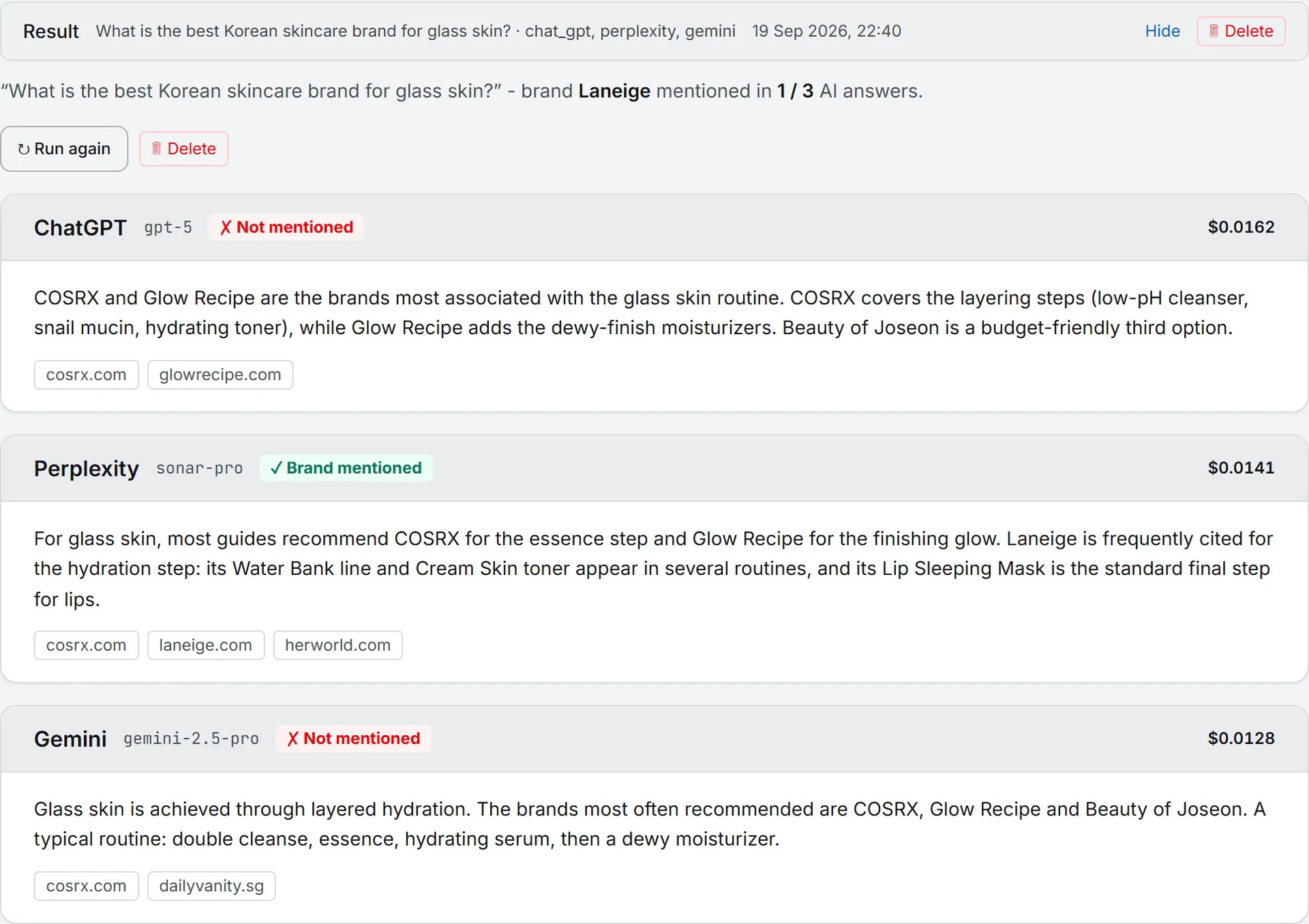
The summary line says in how many answers your brand appears, for example “mentioned in 2 / 4 AI answers.” A brand counts as mentioned when the answer contains one of your brand terms, ignoring case.
Each platform answers with its current default model, and the card names it. The card also shows a Brand mentioned or Not mentioned badge, the answer, its sources and its cost. The run makes one call per model; a model that fails shows its error on its own card.
AI Volume
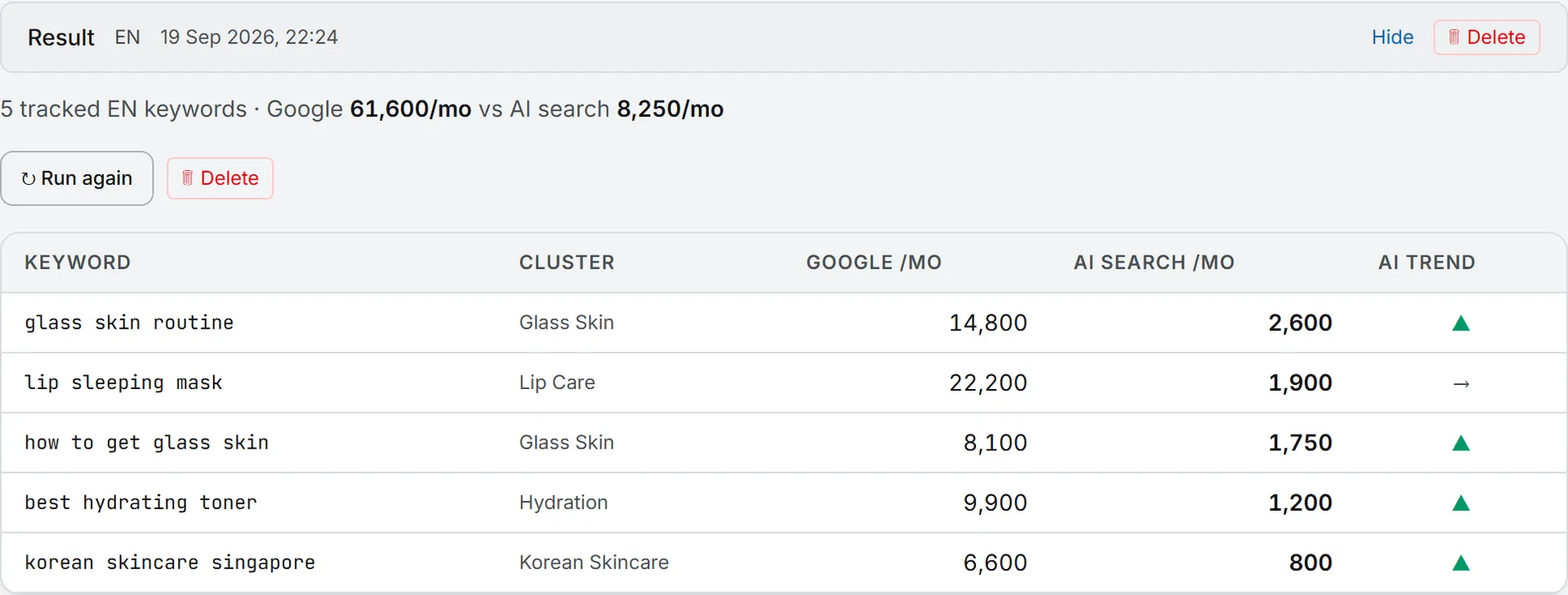
AI Volume puts two numbers side by side for the keywords on your Keywords page: how often people use them in AI tools, and their classic Google volume.
- Pick the language: EN keywords or FR keywords. If the brand doesn’t work in that language, the run falls back to the brand’s first language.
- Pick the scope: All keywords, one cluster (📁), or Pick keywords… to tick them one by one.
- Click 📈 Fetch volumes.
The table lists each keyword with its cluster, Google /mo, AI search /mo and an AI trend arrow: ▲ when AI volume grew more than 15% over the period, ▼ when it fell more than 15%, → otherwise. The summary line adds up both volumes. A run covers up to 500 keywords in two data calls.
Who AI Trusts
It ranks the domains and brands that AI answers cite most for a topic. A site near the top that never mentions you is a gap you can work on.
Type a Topic keyword, such as “website china,” pick Google AI Overview or ChatGPT as the AI platform, and click 🏛 Get the leaderboard. You get two ranked lists: Top mentioned domains and Top mentioned brands. A badge says whether your domain is on the board. The run makes two data calls.
Trends
Pick any domain, yours or a competitor’s, and Trends shows how its AI mentions moved over time. Domain starts on the brand’s website; type a rival’s domain to follow theirs. Choose the AI platform and click 📉 Fetch trends.
A bar chart shows monthly mentions. A table below lists, for each month, Mentions gained, Mentions lost, the Net change and the AI search volume gained and lost. The gains and losses come from real citation changes, not estimates. Two data calls here too.
Markets and languages
As the callout at the top says, the country of every check except Ask the AIs is the brand’s first market. The language you pick applies when the brand works in it; otherwise the brand’s first language is used. Trends and Who AI Trusts have no language choice at all. The Search overview compares this with the SEO pages.
Saved results and history
Whichever tab you run, the results behave the same way.
Every run is kept. A tab lists its results newest first; a new run appears on top, open, and older ones stay folded. Each folded bar shows what the run searched (domain, keyword, question or topic) and when.
Open a result and ↻ Run again repeats it with its saved settings, not with whatever the form holds now. (A hand-picked AI Volume list isn’t stored, so that rerun falls back to its cluster, or to all keywords of the language.) 🗑 Delete removes one result after you confirm. To clear the slate, 🗑 Delete all previous results at the top of the page removes every saved result of the brand, in all tabs; the button shows when the brand had saved results as the page loaded.
While a run works, a status card counts the seconds. You can leave the page: the result is saved when it’s done, and the Activity widget in the header follows it.
AI Conquest Strategy
A share-of-voice result or an AI search result can become an action plan. Each of those results has two tabs: Result and ⚔ Strategy.
- Open the ⚔ Strategy tab of the result you want to plan from.
- Click ⚔ Generate the strategy.
The AI reads that result and uses your other GEO results as background. Its plan has five parts: where you stand, citation channels to conquer, questions to win, a content plan, and an action plan with measurable targets.
Above the plan you’ll see when it was generated, by which model, and what it cost. ↻ Regenerate replaces it. ⬇ Export PDF opens a print window where you can save it as a PDF. The tab shows ✓ once a strategy exists. Each result keeps its own strategy.
The method comes from a skill named AI Conquest Strategy, which your organization gets automatically and can edit. The Manage skills link opens the skills page in a new tab. See Organization and personal skills.
Who can do this
| Action | Viewer | Editor and above |
|---|---|---|
| Read saved results and strategies | Yes | Yes |
| Run any GEO check, Run again | No | Yes |
| Delete one or all results | No | Yes |
| Generate or regenerate a strategy | No | Yes |
An admin can adjust these per role or per person. See Roles and rights. The run buttons stay visible to viewers, but a click only brings up “Your role (viewer) is read-only.” See brands.
What it costs
Each check buys live data from the AI platforms, paid from your credits:
| Check | Calls |
|---|---|
| AI share of voice | 2 |
| AI search results | 1 per platform |
| Ask the AIs | 1 per model |
| AI Volume | 2 |
| Who AI Trusts | 2 |
| Trends | 2 |
| AI Conquest Strategy | 1 AI analysis |
No check quotes a price before you click. Afterward, Ask the AIs and AI search results print the cost on each card, and the strategy prints its cost above the plan. The other checks list their calls and prices in your usage log. See credits and costs.
The AI visibility watcher
The AI visibility watcher agent compares your latest GEO results with its previous pass about every two days. It flags gained or lost visibility, and competitors cited where you aren’t. Each pass also buys the real citations gained and lost that week, one data call. See Agents.
Ask Intelligence can also read your saved GEO results when you ask about AI visibility.
Troubleshooting
- “Pick at least one AI platform.” Tick at least one box before you run.
- “No EN keywords in the database for this brand.” AI Volume reads the Keywords list. Add keywords in that language first, or pick the other language.
- “No saved share-of-voice result to base the strategy on.” The result behind the strategy was deleted. Run the check again, then generate the strategy from the new result.
- One card shows an error. That platform failed; the others still returned. Use ↻ Run again later.