AI models
Each AI feature offers several models and a default your admins set. See how the picker works, what limits options, and what web search costs.
Intelligence doesn’t tie a feature to a single AI model. Each feature offers a list of models from several makers, with one of them set as the default. Administrators choose the list and you pick from it. The options on a form can shift when you switch, and this page explains why.
A default and a list, for every feature
Every AI feature has two settings behind it. The default is the model that runs when you don’t choose one. The offer is the list of models you may choose from. The default is always part of the offer, and if the offer holds nothing else, there’s nothing to pick. The form just says “Runs on” and names the model.
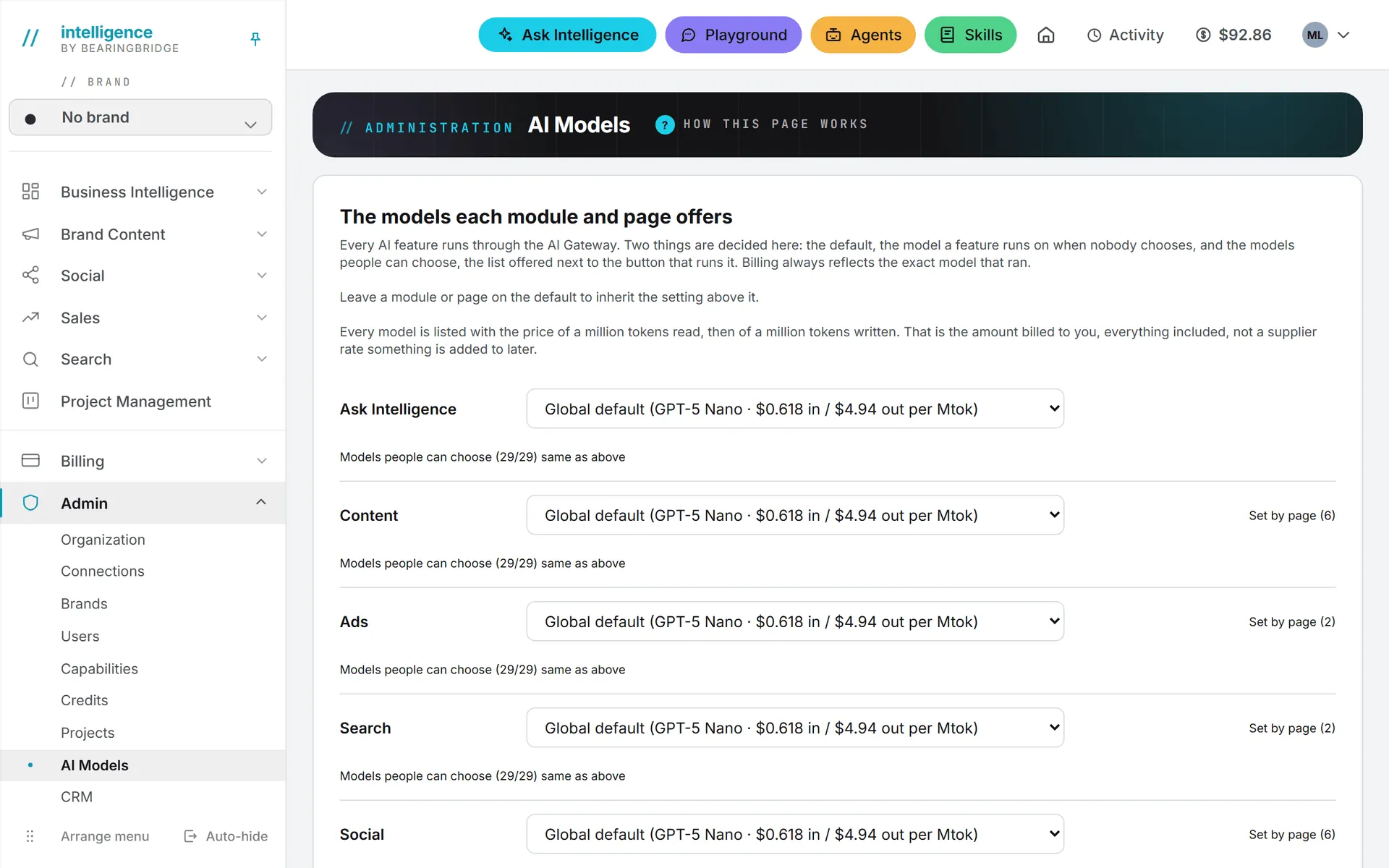
Administrators set both, on the AI Models page under Admin. They can set them for a whole module, such as Social or Search, and again page by page: Editorial long-form content can run on a stronger model than TikTok captions, for instance.
A level with nothing set inherits from the one above it: the page from the module, the module from the defaults every organization starts with. So when an administrator changes a module’s default, everyone who never picked a model moves with it.
The modules on that page are Ask Intelligence, Content, Ads, Search, Social, CRM (quotes and proposals) and Customer Self-Service (the public chat of a service desk). Set by page opens a module’s own menu pages, such as Editorial or LinkedIn, so each can get its own setting.
The model picker
Most AI forms carry a small Model dropdown next to the button that runs them. It lists the models on offer by name, grouped by maker, with the default at the top as “Default: …” Pick another model and that run uses it. The dropdown shows names only, not prices; what a run cost is shown after it.
The data a feature may read stays the same whichever model runs it, and so do the access rules around it.
Your browser remembers the choice for that feature. Write every LinkedIn post on the same model and you’ll only pick it once. If an administrator later takes your model off the list, the picker forgets it and you’re back on the default.
You’ll find the picker on Ask Intelligence, the Brand Content text forms, the social post forms, the AI steps of Search and Ads, and the rewrite menu that appears when you select text.
Two things carry a model of their own instead of a picker. Each service desk has a model setting on its page, chosen from the Customer Self-Service offer (see Create a desk). Each agent has a model in its form (see Agents).
Which model should you pick?
Start with the default. Your administrator chose it for that page. Switch when you have a reason, such as a long article or a question the default keeps getting wrong. Bigger models tend to write better and cost more per run. The small ones are quicker and cheaper, and good enough for most short captions. Brand Content, which writes long pieces over and over, opens on a lower-cost writer unless your organization chose otherwise. To weigh price against quality on your own material, run the same prompt through Compare in the Playground: each answer shows its own cost.
Text, image, and video models
Text models write: answers, articles, posts, ad copy, quotes, findings. They come from Anthropic (Claude), OpenAI (GPT), xAI (Grok), DeepSeek, Qwen, Zhipu (GLM), Kimi and Mistral. Your administrator decides which of them each feature offers.
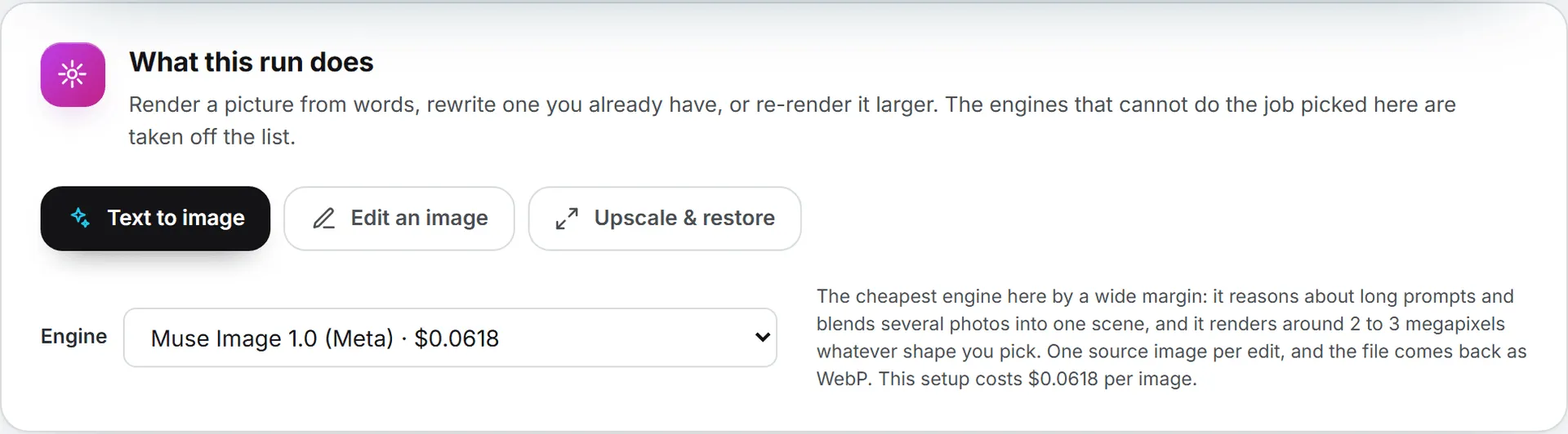
Images and videos are handled another way. They run on engines of their own, and you choose the engine on the image or video form. The AI Models page doesn’t list them. Image engines include ChatGPT Image, Nano Banana, FLUX, Seedream, Muse Image, and Grok Imagine. Video engines include Veo, Kling, Wan, Grok Imagine, Seedance, MiniMax, and Gemini Omni Flash.
The image form lists only the engines that can do the job you picked: Text to image, Edit an image, or Upscale & restore. Each engine shows its price in the list. The form opens on the cheapest engine able to do the job, and the video form opens on the cheapest engine too. In practice, the job narrows the list more than anything else: editing an existing picture rules out several engines that only render from text. The Images and Video articles go through every engine option.
A model’s limits decide the options
If you only write text, you can skip ahead to web search. This part matters most for images and video. Each model declares what it can do: sizes and shapes, resolutions, how long a video may run, whether it adds sound, which file formats it takes. A form only offers what the chosen model declares, which is why the options change when you switch engine.
Files you attach are checked the moment you pick them. The format, the file size, the length of a clip, and the frame size are compared with what the engine accepts, and if one doesn’t fit, the form tells you why right away, before any render is paid for.
Some options are left out on purpose. The ChatGPT Image engines have an automatic quality setting, but it isn’t offered, because its price can’t be shown before the run.
Web search
Only some models can search the web on their own. Claude and GPT models can, and so can Grok 4.6 and Grok 4.20 Reasoning. The others work from what they’re given.
Ask Intelligence allows web search unless an administrator turns it off for the organization on the AI Models page. You then turn it on or off for each conversation with the Web search switch. While it’s on, the model list shows only the models that can search, so turning the switch on may move you off a model that can’t. If the switch can’t be used, it stays on screen grayed out and says why. More on that in Data and web search.
The Playground works much the same way: the web button is there for the models that search and out of reach for the others. A conversation starts with it off, and administrators can turn it off for the whole Playground.
Note: A web search costs about a cent. It’s charged like any other paid call and is added to the price shown under the answer. The pages the model read are listed with the answer.
What a model costs
Prices vary from model to model. On top of that, a run pays for the text the model actually reads and writes, so a long brief costs more than a short one on the same model.
Every run shows what it cost, next to the result, and lands in your usage log. The image and video forms show the price before you click.
Administrators see each text model’s price on the AI Models page: the price of a million tokens read, then of a million tokens written, as billed to you with everything included. Members don’t see those figures, only the cost of each run. How runs are paid for is covered in Credits and costs.
Trying models side by side
If you’re unsure which model suits a job, the Playground is where to find out. You chat with a model directly, with none of your data, and Compare sends one message to up to three models side by side, each with its own cost. Administrators choose which models it offers. See Playground.
When models are added or withdrawn
The model list isn’t fixed. The BearingBridge team can add a new model to the app at any time, without a release, and it then becomes available to choose on the AI Models page. Models can also be withdrawn. When that happens, any setting that pointed to the withdrawn model falls back to the level above it, and a picker that remembered it goes back to the default, so the feature keeps working.
Who can do what
| Action | Who |
|---|---|
| Pick a model from the offer when running a feature | Anyone allowed to run that feature (viewers can’t run AI features at all) |
| Set the default and the offer for a module or page | Administrators, for their own organization |
| Allow or block web search in Ask Intelligence | Administrators |
| Choose the Playground models and allowance | Administrators |
| Pick an image or video engine | Anyone allowed to use the image or video form |
The steps are in AI models administration.
Tip: If you run a personal account, you’re its administrator, so every setting on this page is yours.