Usage log
The Usage page lists every paid action with its model, brand and price. Members see their own calls; admins see and filter their whole organization.
The Usage page logs every paid action, what ran and when, with its price. When someone asks “where did the budget go?”, this is where you look. Everyone can open it, and your role decides whose actions you see.
What you see
| Who you are | What the log shows |
|---|---|
| A member who isn’t an admin | Your own paid actions. |
| An admin of an organization | The paid actions of every user in your organization, plus its daily storage charge. |
| The owner of a personal account | Everything paid in your account, storage included, since you’re normally the admin of your own organization. |
Admins tend to use it when setting daily allowances, to see who spends what. See shared credits.
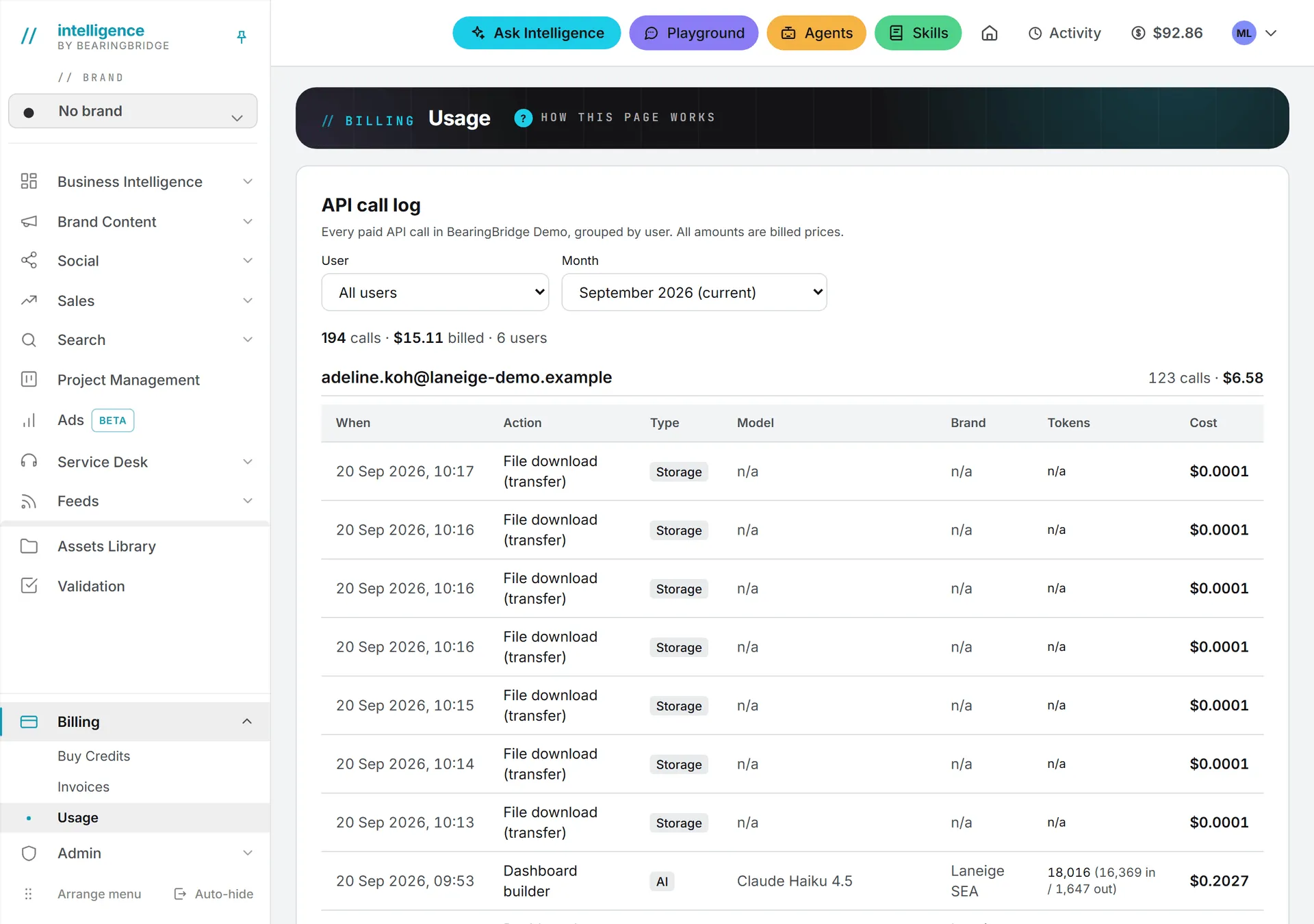
Filters
- Month: the current month, marked “(current)”, or the previous one. Months run from the first to the last day, in UTC. Older months aren’t available.
- User: admins only. Pick one person from your organization, or All users. Who sees whose actions follows roles and rights.
Change a filter and the log reloads right away.
Reading the log
The page is called Usage in the menu, but the card is titled API call log, and right under it a line sums up the month: the number of calls, the total billed and, for admins, the number of users.
Actions are grouped by person, under their address, with their number of calls and their total. The daily storage charge has its own group, File storage. Inside a group, each row has:
| Column | What it shows |
|---|---|
| When | Date and time, in your date and time settings. |
| Action | What ran, in plain words. |
| Type | AI for model calls, Data for search data, Storage for file rent and downloads, Social for publishing on X. |
| Model | The model that ran, when there was one. |
| Brand | The brand the action was for, or “n/a” when it wasn’t tied to one. |
| Tokens | For AI text calls, the total with the split in and out. Otherwise “n/a”. |
| Cost | The final price charged to your credits, to four decimals. Nothing is added later. |
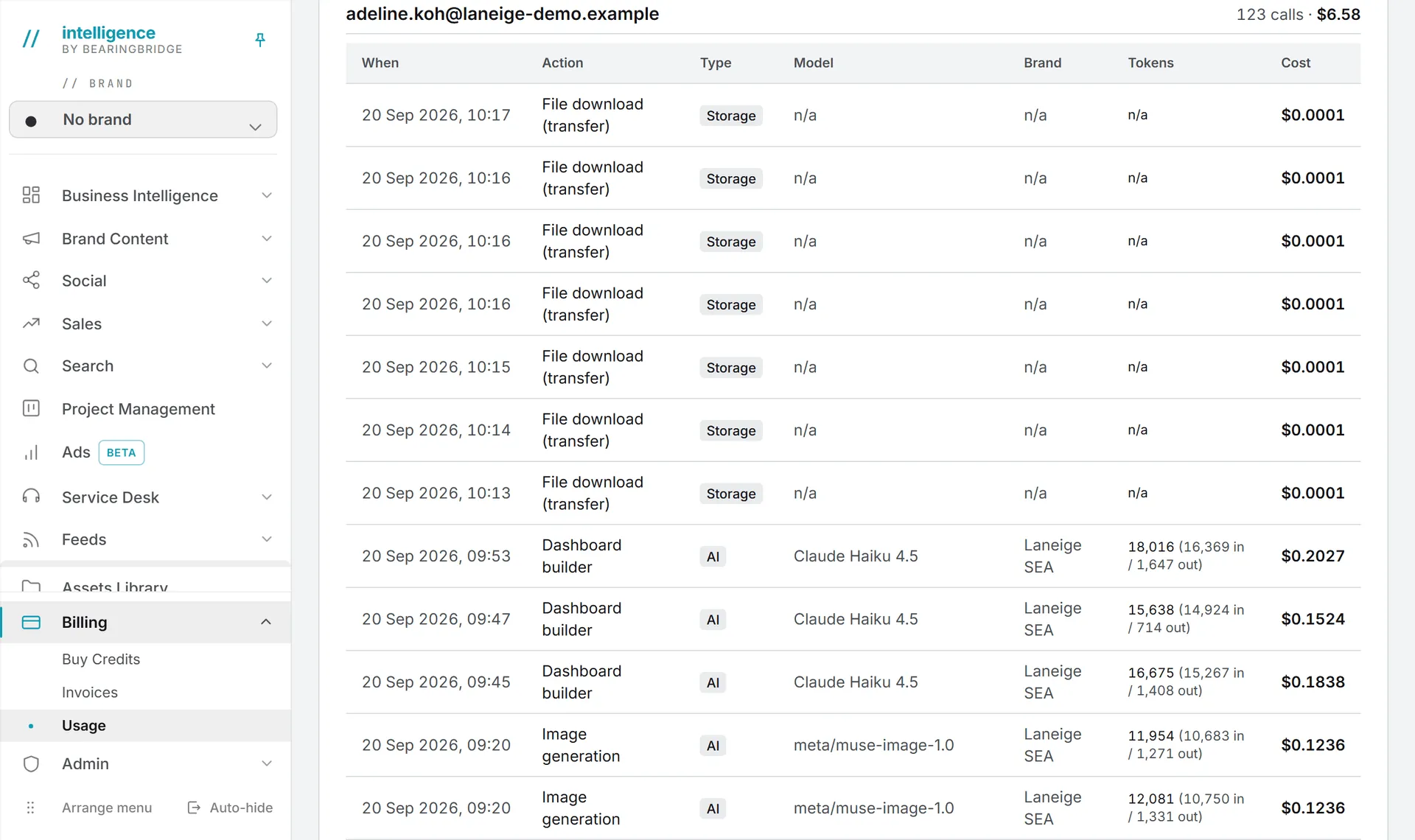
A few of the action names you’ll run into:
- Ask Intelligence
- Content plan generation
- Image generation and Video generation
- SERP refresh and Keyword ranking refresh
- Ads keyword suggestions, Ad copy generation and Negative keyword generation
- GEO · brand mentions, GEO · AI responses and the other GEO reports
- Social · published post and Social · post replaced
- File storage (daily) and File download (transfer)
A few actions still show under a short code name instead of a label.
Currencies
Amounts show in US dollars first. If your organization displays other currencies, they follow, for example “$1.20 / ¥8.70”. Treat the extra currencies as a rough guide; billing is in dollars.
Limits
A month shows at most 5,000 calls. Past that, an amber line tells you the log was cut short.
To see whether shared credits or your own paid for an action, use the credit history on the Invoices page, which lists each set of credits separately.
The page has no export button. For a movement-by-movement record of the balance, including purchases, see the credit history on the Invoices page.
Usage log or credit history?
| Usage log | Credit history | |
|---|---|---|
| Shows | Paid actions only | Every movement: purchases, top-ups, usage, adjustments |
| Period | Current or previous month | The last 100 movements |
| Filters | Month, and user for admins | Whose credits, for admins |
| Detail | Action, type, model, brand, tokens, cost | Action, model, amount, balance after |
See Invoices and credit history. For what each action costs and why, see what costs credits.