What Ask can read
Ask Intelligence reads only what your rights and brands open to you: app data and allowed connected systems, nothing public unless web search is on.
Ask Intelligence reads the data you are allowed to see in the app, and nothing else. Below is every area it can read, the right that opens each one, and what it stopped reading.
Read it when you wonder where an answer came from. Admins deciding who sees what will find it handy too.
Who decides what Ask reads
Ask reads the same data you can open on the pages of the app. Your rights come first: each area needs the matching right on your role, or on your own rights if an admin set some for you (see Roles and rights). Then your brands: data that belongs to a brand is read only for the brands you have access to (see Data access and privacy). Last, the conversation itself, which you can narrow further with Brands and Data included.
For admins, that means the way to keep someone’s answers away from an area is the same as keeping them off its pages: change the right on their role or on their own rights. There’s no separate Ask setting for it. Admins, for their part, can’t read the questions other people ask.
Ask works in a closed world. It won’t bring in public information, or general knowledge about markets and companies. The only exception is Web search, when your organization allows it and you switch it on. See Data, brands and web search.
Note: Ask only reads. It never changes your data in the app. The one thing it can write is an email draft in your own Gmail, and only when you ask for one.
The areas of the app
Here are the groups listed under In the app in Data included. A group only shows if you have access to at least part of it. The rights are named as they appear on the roles grid your admin edits.
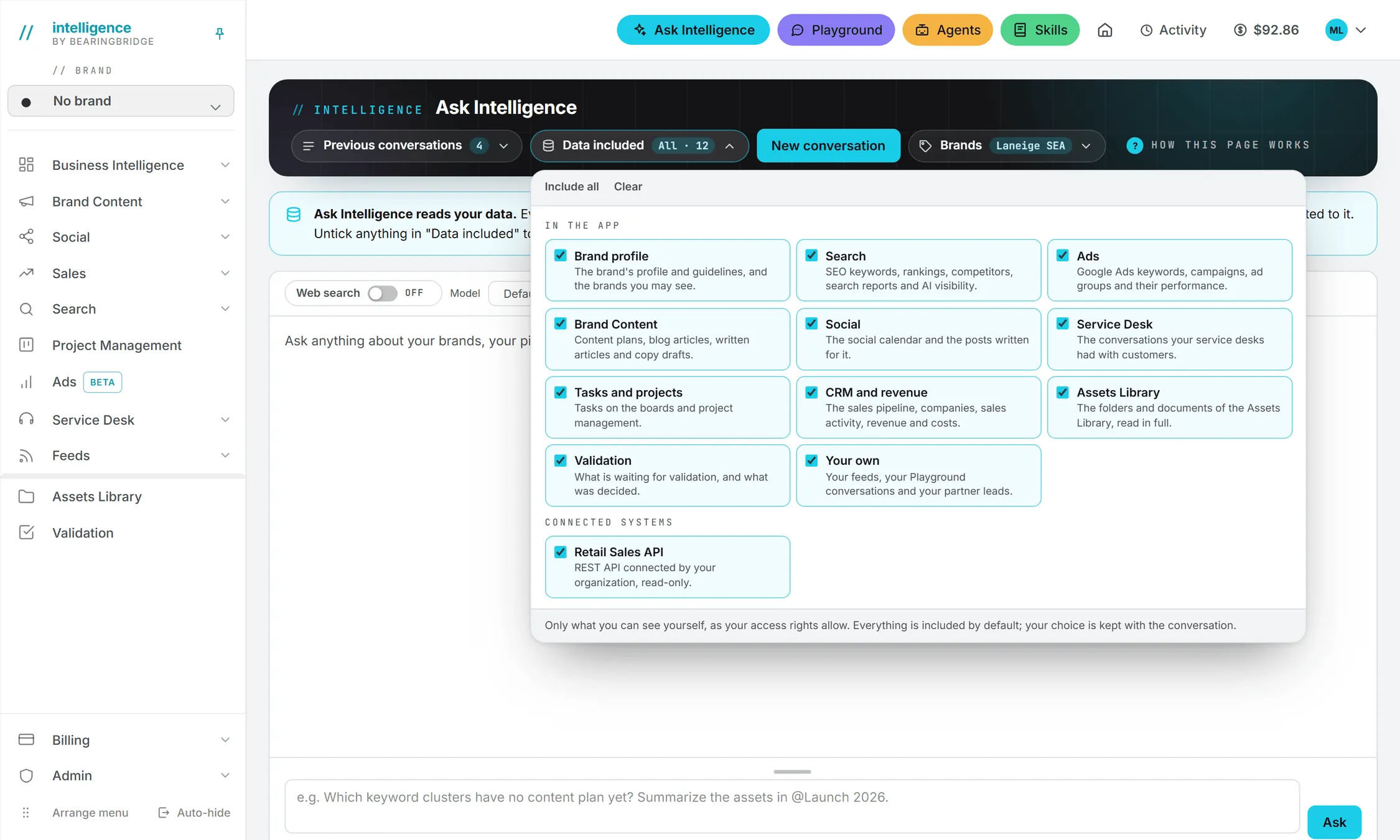
| Group | What Ask reads | Right needed |
|---|---|---|
| Brand profile | The brand’s profile (website, target customers, positioning, modules), its editorial guidelines and brand voice, and the list of brands you may see. | Access to the brand. The guidelines also need Content: Text or Social Content. |
| Search | SEO keywords, rankings and their history, tracked competitors, keyword gaps and conquest strategies, saved search reports, AI visibility results, and the Google Ads keyword selection. | Google Search (SEO). AI visibility needs AI Search. The keyword selection is also open with Google Ads. |
| Ads | The Google Ads keyword selection, campaigns with budget and status, ad groups, ads, negative keywords and the latest synced performance. | Google Ads |
| Brand Content | Content plans, blog articles, written articles and copy drafts, and the full text of any piece. | Content: Text |
| Social | The social calendar, the posts and TikTok briefs written for it, and the repurposed versions of articles. | Social Calendar for the calendar, Social Content for the posts |
| Service Desk | Your service desks, their knowledge documents, and recent visitor conversations with what was asked, what was answered and any contact details the visitor left. | Service Desk |
| Tasks and projects | The brand’s task board, and the organization’s projects with their active tasks, dates and assignees. | Project Management |
| CRM and revenue | Deals and pipeline, client and supplier companies with their contacts, sales activity, revenue lines, payables and costs. | CRM for the sales data. Revenue Follow Up for revenue and costs. |
| Assets Library | The files you may see, the folder tree, and the text of documents: PDF, Word, Excel, Markdown, plain text and texts written in the app. | Being a member of an organization |
| Validation | What is waiting for validation, who validates it, the comments and the decisions. | Being a member of an organization |
| Your own | Your news feeds with their latest headlines, your Playground conversations, and your partner leads. Only yours, never a colleague’s. | Nothing for feeds, Playground for chats, a partner account for leads |
Revenue Follow Up is open to admins only unless your organization’s roles say otherwise, so most people won’t see revenue and costs in their answers.
The Google Ads keyword selection sits in both Search and Ads: it’s read if either group is included.
Project data follows the same rules as the Project Management pages. Ask reads the projects and tasks you can see there, not everything the organization has.
Every area Ask reads adds tokens to the price of the answer. Ask picks what to read from the question, so a narrow question usually reads less than a broad one and comes out cheaper.
The names under Based on: in an answer are more precise than the groups. For example, a Search answer may say “SEO keywords · Rankings · Competitors”.
Brand data and organization data
Brand profile, Search, Ads, Brand Content, Social, Service Desk and the task board belong to a brand. Ask reads them only for the brands picked in the conversation. With no brand picked, it doesn’t read them at all.
The rest belongs to your organization: CRM and revenue, project management, the Assets Library and validation. Ask reads them whatever brands you picked. Rows tagged with a brand you can’t access are still left out. See brands.
Work filed under No brand
Anything filed with no brand belongs to the person who made it until they share it. Ask reads your own. It reads a colleague’s only if they shared it with the organization or with one of your brands, or sent it to you for validation. Being an admin doesn’t change this.
Assets Library documents
Ask can read a whole folder, or a single document, when your question points at it or needs it. It reads text only: images and videos are listed by name and type, but their content isn’t looked at. Type @ in the question box to point at one. Reading a document counts as a download and is charged like one. See Storage costs.
Connected systems
That covers the app itself. Your organization may also have plugged in systems from outside.
The second part of Data included, Connected systems, lists the outside systems Ask can reach. It reads them live, and read-only.
| Level | What it covers | Who Ask reads it for |
|---|---|---|
| Your organization’s | MCP servers, REST APIs and Google Sheets accounts an admin connected. | Admins read every one. Everyone else reads only the ones an admin granted them on the Users page. |
| Your own | The Gmail and Google Sheets accounts you connected yourself. | Only you. Nobody else, admins included. |
An organization’s Zoho connection is read only by people who also have the CRM right.
Your organization’s systems show under their own names. Your own accounts show as “Your Gmail” or “Your Google Sheets”. See Connections and My connections.
Your Gmail
Ask looks in your mailbox when the question is about your own mail. It searches first, and opens a message only when it needs what’s inside.
If you ask it to write an email, it writes the whole message and leaves it as a draft in your Gmail Drafts folder, then tells you what it says. Drafting is on by default when you connect Gmail. It sends a mail only if you turned sending on for that connection yourself and you clearly tell it to send.
What Ask no longer reads
Since September 19, 2026, Ask sticks to your business data. It no longer reads:
- the team: who is in the organization, and their roles
- skills
- agents: their list, their findings, the operating reviews and the executive reports
- spend and usage
- credits and billing
Those have pages of their own: Users and invitations, Skills, Agents, the Usage log and Billing.
If an area of the app isn’t in this article, Ask doesn’t read it.
When data is missing
Sometimes the data you asked about isn’t open to you, was left out of the conversation, or doesn’t exist. Ask then says so. It doesn’t guess, and brands you can’t see never come up by name. It usually tells you which part of the app would produce the missing data, or which box to tick in Data included.