Exports and downloads
Every export in Intelligence in one place: PDFs, Word, Markdown, CSV, pictures, video and invoices, what each one costs, and what you cannot take out.
Sooner or later you need a file: a PDF for a client, a Word document for a colleague who never signs in, the original picture your designer keeps asking for. Intelligence has no single Export button. Each module hands its work over in the shape that suits it, and this page maps all of them. Anyone can use it, whatever their role.
Everything at a glance
| Where | Button | You get |
|---|---|---|
| Playground, on any answer | Download as… | Word (.docx), PDF, Markdown, Text, HTML, Table as CSV, or Tables as Excel |
| Playground, whole conversation | Export thread | A Markdown file of the exchange |
| Copy studios, on a version | PDF, Markdown | The piece, headed by the brand logo in the PDF |
| Articles, on a version | The article with the brand logo and its details | |
| Project board, Done card | The completed tasks for the period you picked | |
| AI search, Conquest strategy | Export PDF | A print window you save as a PDF |
| Image studio | Download image, Download clean copy | The picture, as generated or stripped of its metadata |
| Image tools, anonymizer | Download clean image | The cleaned picture |
| Video studio and YouTube | Download video | An MP4 |
| Assets Library, row menu | Download | The file exactly as stored |
| Any picture opened large | Download | The picture on screen |
| Billing, Invoices | The invoice for that purchase | |
| Social, publishing by hand | none, it happens on its own | One PNG per slide and a text file, when the clipboard is refused |
Wherever a Copy button sits next to these, it is usually the faster route. Copy puts the text on your clipboard with no file to find afterward.
Before you download anything, ask whether you need to. Generated texts, pictures and clips are saved to the Assets Library as they are made, and anything already in the product can be sent to a colleague through Validation or pasted with Copy. Downloading is for getting work out of the product, not for moving it around inside.
Who can export what
There is no export right of its own. If you can see something, you can take it with you. That means brand access decides most of it: a person who sees one brand exports that brand’s work and nothing else. Data access and privacy explains where that line is drawn. The one place worth naming is the project board, where even view-only rights include the PDF of completed tasks.
The Playground has the widest choice
Only the Playground turns an answer into an office format. Under any answer, Download as… opens a short menu:
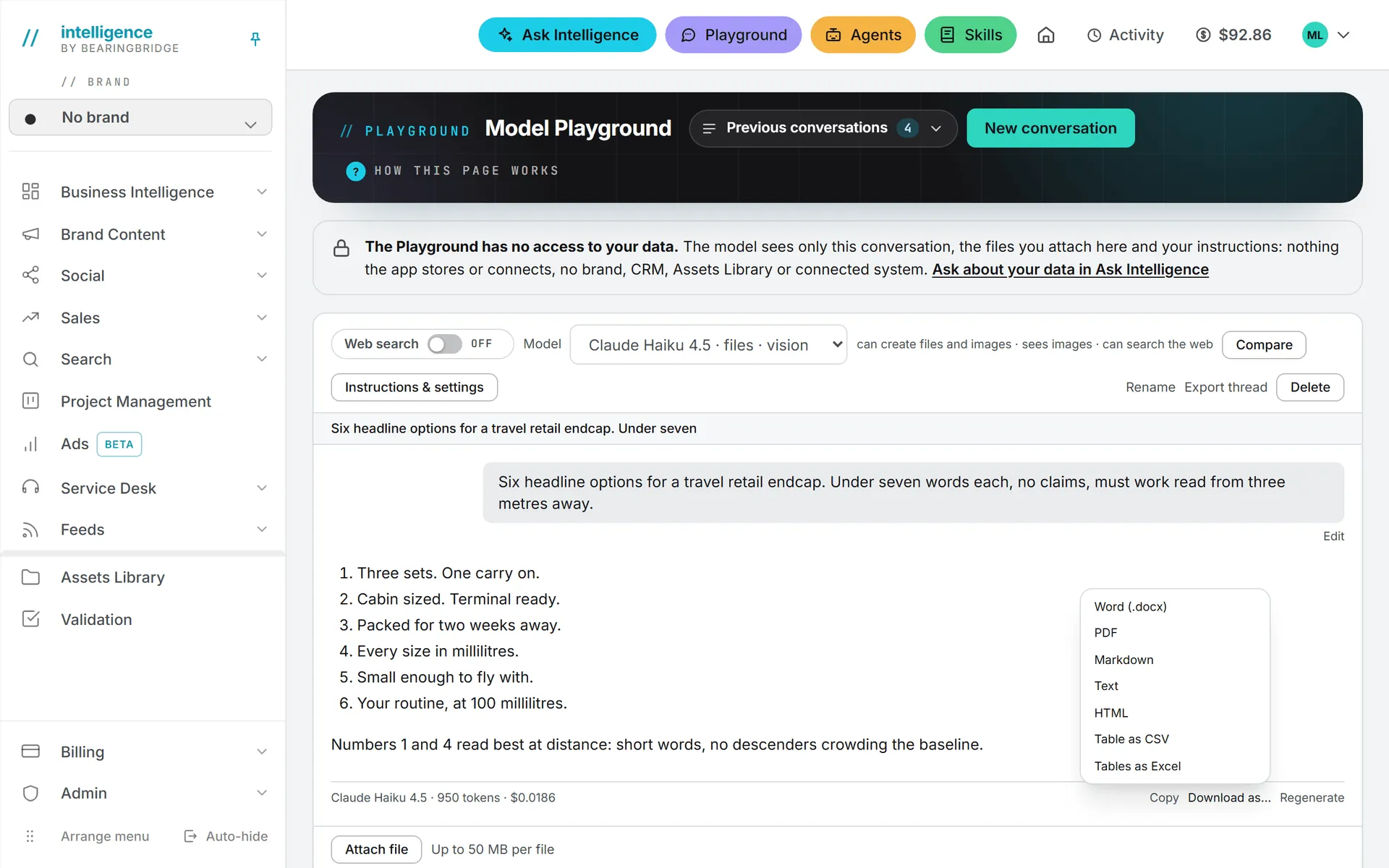
Word (.docx) and PDF are for something you will send to a person. Markdown, Text and HTML are for something you will paste into another tool. Table as CSV and Tables as Excel appear for their own reason: an answer that holds a table, which you probably want in a spreadsheet rather than in prose.
Export thread, at the top of the conversation, saves the whole exchange as one Markdown file. Files the model builds for you during a conversation appear as chips you click to download.
PDFs the product builds for you
Four screens render a document the moment you ask for it. Nothing is kept afterward, so the file on your machine is the only copy.
In a copy studio, each saved version carries PDF and Markdown. The PDF opens with the brand logo and a line giving the format, the language, the word count, the version and the date. Notes the writer left under Notes from the writer (not part of the copy) are left out of both files.
In the article workspace, a version carries PDF only. It prints the brand logo, the title and a line with the keyword, the language, the word count and the date, plus the publication address when there is one. There is no Word export here: copy the text and paste it into your document.
On the project board, the Done card has a PDF button. It reads Preparing… while the server renders the completed tasks for the period and filters you chose, archived tasks included. Anyone who can see the board can export it, view rights included.
In AI search, the Conquest strategy offers Export PDF. This one behaves differently. A clean print window opens, and you save the PDF from there.
Note: The PDFs use standard fonts that cover Western European characters. Chinese, Japanese, Korean, Cyrillic, Greek and Arabic characters drop out. For those, use Markdown or Copy instead.
Pictures, videos and stored files
The image studio gives two buttons under a result. Download image saves the picture as generated. Download clean copy re-encodes it first, which strips the metadata out of the file. The anonymizer in image tools ends the same way, with Download clean image.
The video studio and the YouTube tool both end on Download video. Both give you an MP4.
In the Assets Library, the menu at the end of a row holds Download, which gives you the file exactly as it is stored. Open any picture large, in the library or anywhere else in the product, and the viewer carries a Download button too.
That is the text side. The rest of what you can take out is already a file before you touch it.
Invoices
Every credit purchase comes with an invoice. On Invoices, each row carries a PDF link that opens the document from the payment provider. The confirmation email for a purchase carries the same link.
Social posts you publish by hand
When you publish a post yourself rather than letting the product send it, the material is handed over rather than exported. The copy goes to your clipboard, and the network’s own composer opens. If the browser refuses the clipboard, or there is no composer to open, the pictures come down as one PNG per slide and the copy as a text file, so nothing is lost on the way. See publishing.
What it costs
Most exports are free. Building you a PDF, a Word file or a Markdown file is not a paid action.
Pulling a stored file down is different. It is billed by size, and it shows in your usage log as File download (transfer). That covers a download from the Assets Library or the Playground, a preview in Validation, a library folder read as context for an AI run, and a file sent to a video render.
There is no price list for it. A big video costs more than a one-page PDF, and the amount lands in the usage log once the download is done. To gauge it, look at what a similar file cost you last time. The wider picture is in what costs credits and storage costs.
With an empty balance, the free exports keep working: a PDF the product renders, a Markdown file, a Word file from the Playground. A download billed as transfer is blocked like any other paid action until you top up.
What you cannot export
A few things the product does not do, so you can stop looking:
- No CSV of a list. The usage log, the desk conversations, the CRM lists and the keyword tables stop at the screen. The only CSV in the product comes from a table inside a Playground answer.
- No Word export outside the Playground. The copy studios and the article workspace offer PDF and Markdown only.
- No calendar file. The social calendar does not produce an .ics you can drop into Outlook or Google Calendar.
- No bulk download. Files leave the library one at a time, and there is no “download everything” for a brand or a folder. For a large move, plan it as a series of downloads rather than one.
If you need an export the product does not offer, say so through the bug report form, choosing the module it belongs to. Feature requests go through the contact form.
Troubleshooting
Nothing happened when I clicked. Browsers block downloads that start on a page they think you left. Click again, then check the download bar and your Downloads folder before you decide it failed.
The PDF is missing characters. Standard fonts only. Use Markdown or Copy for non-Latin scripts.
The Conquest strategy opened nothing. That export uses a print window, which a pop-up blocker treats like any other new window. Allow pop-ups for the product and click Export PDF again.
The Done card’s button is stuck on Preparing…. The report is rendered on the server, so a long period with many tasks takes a moment. Narrow the period or the filters if it does not come back.
The file came down with a machine-made name. A generated picture falls back to a name built from the moment it was made when the asset has no name of its own. Rename it in the library first, then download it again.