Automatic top-up
Automatic top-up charges a saved card when credits fall under a threshold. Set the amount and the daily limit, switch it off, or restart it.
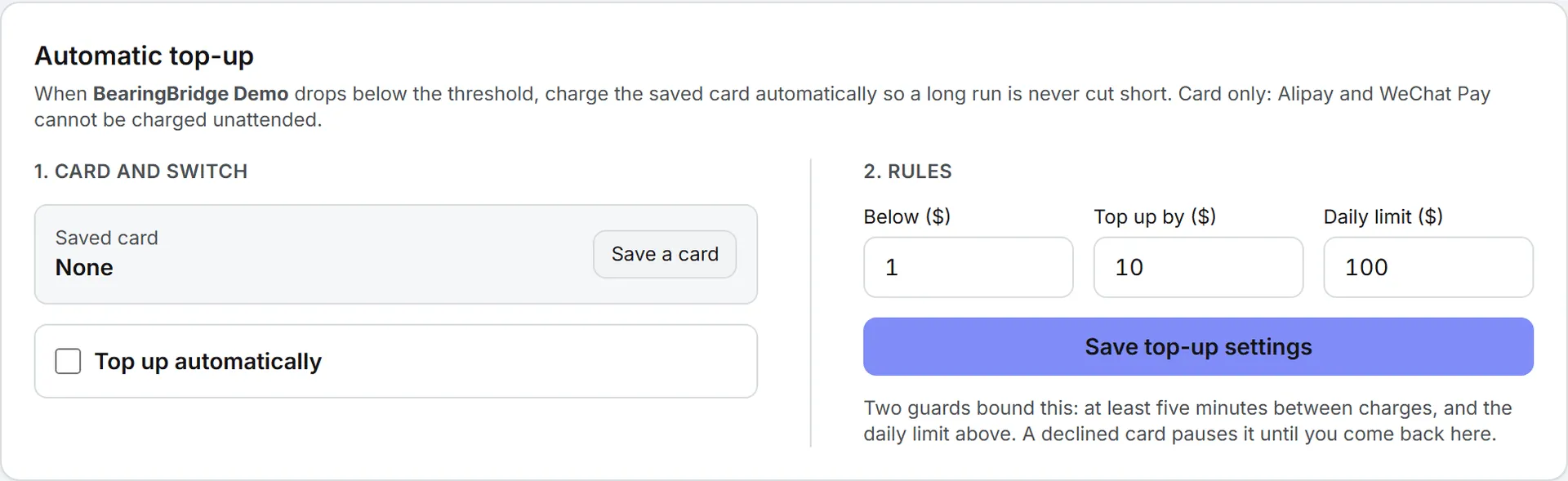
Automatic top-up charges a saved card when your credits drop below a threshold you choose. That way a long run or a scheduled agent doesn’t stop halfway. You set it on the Buy Credits page, in the Automatic top-up card under the purchase form.
Before you start
Automatic top-up needs a card. Alipay and WeChat Pay can’t be charged while you’re away, so even if you usually pay with one of them, save a card for top-ups.
Your own credits and the organization’s shared credits each keep their own card and settings. You can set top-up on your own credits whatever your role; the organization’s are for admins.
Save a card
- Open Billing > Buy Credits.
- If you’re an admin, pick the organization or Your account in the tabs at the top of the purchase form. The top-up card follows that choice and names it: “When Your account drops below the threshold…”
- In Automatic top-up, under 1. Card and switch, click Save a card.
- Enter the card on Stripe’s page. Nothing is charged.
- Stripe sends you back with “Card saved. You can switch on automatic top-up now.”
If you leave Stripe’s page without saving, you see “Card setup cancelled.”
Stripe keeps the card. You type the number on Stripe’s own page, so it never reaches Intelligence. The page shows the card as, for example, “Visa ···· 4242, expires 08/2029”. To change it, click Replace card.
Turn it on
- Tick Top up automatically.
- Under 2. Rules, fill in the three fields.
- Click Save top-up settings. The page confirms with “Automatic top-up saved.”
| Field | What it means | Default |
|---|---|---|
| Below ($) | Charge when the balance falls under this amount. Zero or more. | $1 |
| Top up by ($) | How much to buy each time, from $10 to $1,000. | $10 |
| Daily limit ($) | The most charged automatically in one day. It can’t be smaller than one top-up. | $100 |
The Save button turns amber while you have unsaved changes.
Tip: Set Top up by well above Below. One charge then lifts the balance clear of the threshold, instead of a string of small top-ups five minutes apart.
If you tick the switch with no card saved, saving fails with “Save a card first. Alipay and WeChat Pay cannot be charged automatically.”
What triggers a top-up
With the rules saved, you don’t have to think about it again until something changes.
After every paid action, the app looks at the balance. If it’s now under your threshold, the saved card is charged the Top up by amount.
The top-up comes after the action that crossed the line, so for a few seconds the balance sits lower. The new credits land once Stripe confirms the charge.
Two guards keep it in check:
- At least five minutes pass between two automatic charges.
- The total charged automatically in one day can’t go over your daily limit. The day runs from midnight to midnight UTC.
That daily limit is there for the worst case, such as an agent stuck in a loop: it can use up credits, but it can’t keep charging your card.
A top-up costs exactly its amount, in US dollars. No fee is added. Each one gets its own Stripe invoice. It shows on the Invoices page as Automatic top-up, and the card shows “Last automatic charge” with the date and time.
You also get an email. Its subject starts “AI credits added”, like a purchase, and it opens on “Your credits were topped up” with the amount and the new balance. For your own credits it goes to you. For the organization’s shared credits it goes to the organization’s billing email.
Turn it off
Untick Top up automatically and click Save top-up settings. The card stays saved for later.
When a top-up fails
Automatic top-up pauses when a charge is declined or needs your approval at the bank, and when the next charge would pass the daily limit. A red box on the card reads Automatic top-up is paused. followed by the reason. For the daily limit, the reason reads “Daily automatic top-up limit reached”, with today’s total.
It won’t retry on its own, so fix the cause first: replace the card, or raise the daily limit and save. Then click Try again in the red box. The page confirms with “Automatic top-up re-armed.”
In the meantime, nothing stops you from buying credits by hand. See buy credits.
Good to know
- The threshold is compared with the balance of the credits that paid the action, not with the total in the top bar. For a member drawing on shared credits, it’s the organization’s top-up that fires, not theirs.
- Turning top-up on doesn’t charge anything right away. The first charge waits for a paid action that takes the balance under the threshold.
- Shared credits with automatic top-up on don’t trigger the low-credit email to admins, since they refill themselves.
How credits work is explained in credits and costs.