Positions
Positions shows your site's place on Google month by month since October 2020 and each tracked keyword's position over time, for any period you choose.
Watch the video
Positions shows where your website has stood on Google over time. One card follows the whole site month by month, as far back as October 2020. The other follows each keyword you track, over the last twelve months and from now on.
What you need
- The brand needs a website. Every position on this page is the position of that site.
- For keyword positions, the brand needs tracked keywords on the Keywords page.
- The markets and languages offered are the brand’s own. Both live in the brand settings (Brands administration).
Pick the market, language and period
Open Search, then SEO, then Positions. Three lists sit at the top of the page:
- Market: the country whose Google results you read.
- Language: the language of those results. Keyword positions lists the keywords in that language.
- Period: Last 3 months, Last 6 months, Last 12 months, Last 2 years, Last 3 years, Since October 2020, or Custom period, which adds From and To months.
The period filters both cards at once, from what is already loaded, without any charge. The page remembers the last period you picked.
Google measures a month once it is over, so site visibility runs to last month. Keyword positions also show this month’s rank checks.
Site visibility
The first card counts, for every month of the period, the searches where your website appeared in Google’s top 20, and the visits those positions are estimated to bring.
Click Load this period to read the months of the period. The price shows under the button before you click, for the number of months chosen. Once loaded, the months are kept for the brand: everyone on it sees them, and changing the period costs nothing more. When every month of the period is loaded, the button reads Refresh this period and reads them again.
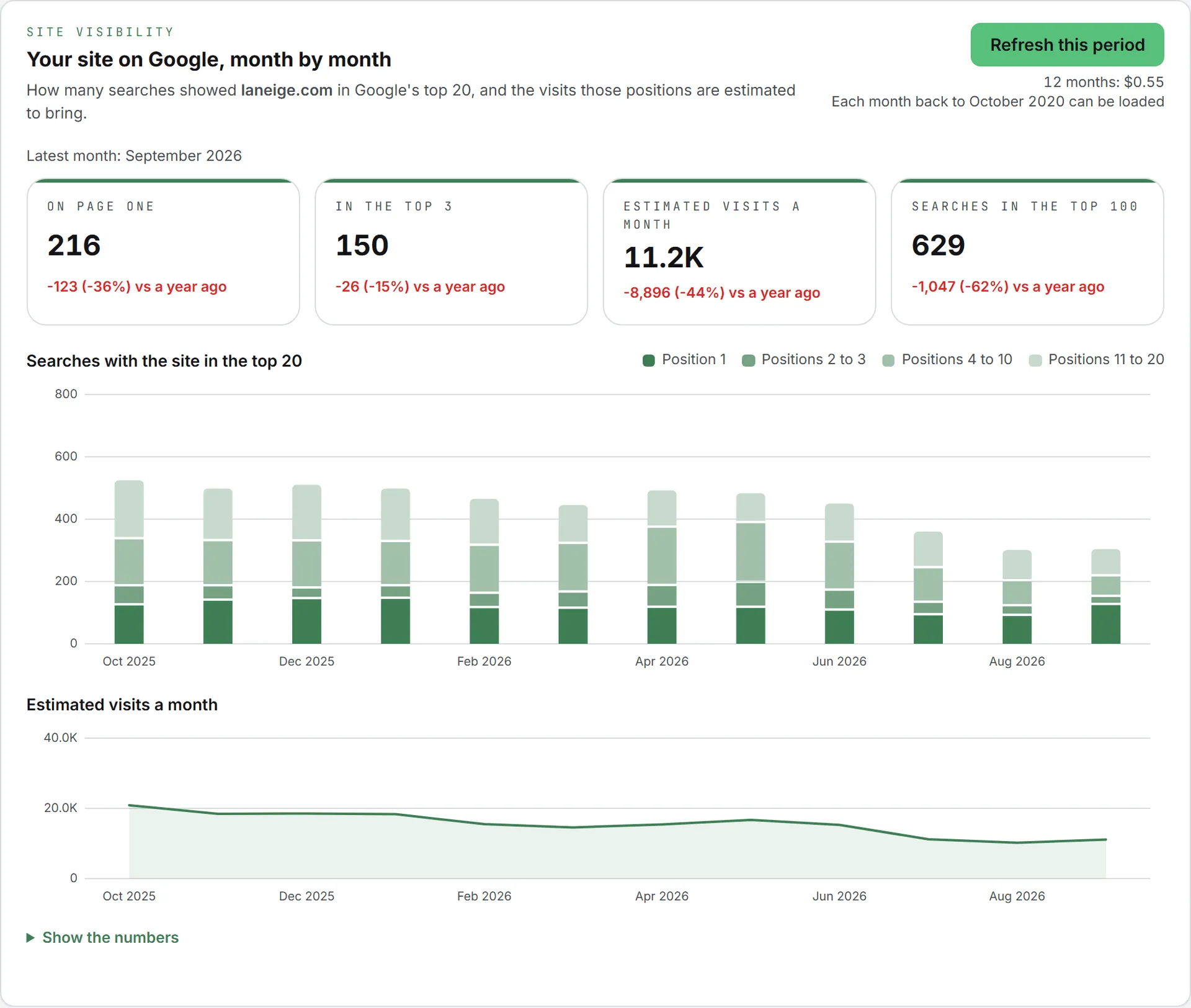
The tiles show the latest month of the period, compared with the same month a year before when that month is loaded:
| Tile | What it counts |
|---|---|
| On page one | Searches where the site is in positions 1 to 10 |
| In the top 3 | Searches where the site is in positions 1 to 3 |
| Estimated visits a month | The visits those positions are estimated to bring |
| Searches in the top 100 | Every search where the site appears in the first 100 results |
Below them, Searches with the site in the top 20 stacks four bands per month: position 1, positions 2 to 3, 4 to 10 and 11 to 20, the darker the better. Hover over a month to read its numbers. Estimated visits a month draws the visits as a line. Show the numbers opens the same figures as a table.
A month the period covers but nobody loaded yet shows as a gap, and a line above the tiles says how many are missing.
Keyword positions
The second card has one row per tracked keyword in the chosen language. Keywords with readings come first, the best placed at the top.
| Column | What it shows |
|---|---|
| Keyword | The tracked keyword |
| Cluster | Its topic group on the Keywords page |
| Trend | The position over the period: higher is better, and a dash at the bottom marks a reading where the site was absent |
| First reading | The position at the first reading of the period, and its month |
| Latest | The position at the last reading, and its date |
| Change | Places gained (▲) or lost (▼), Steady, Entered or Dropped out |
Click a row to open its full chart. Position 1 sits at the top, the first page is shaded, and readings where the site was not in the results sit on the Absent line at the bottom. Hover over a point to see its date, its position, the page of yours that ranked, and where the reading comes from.
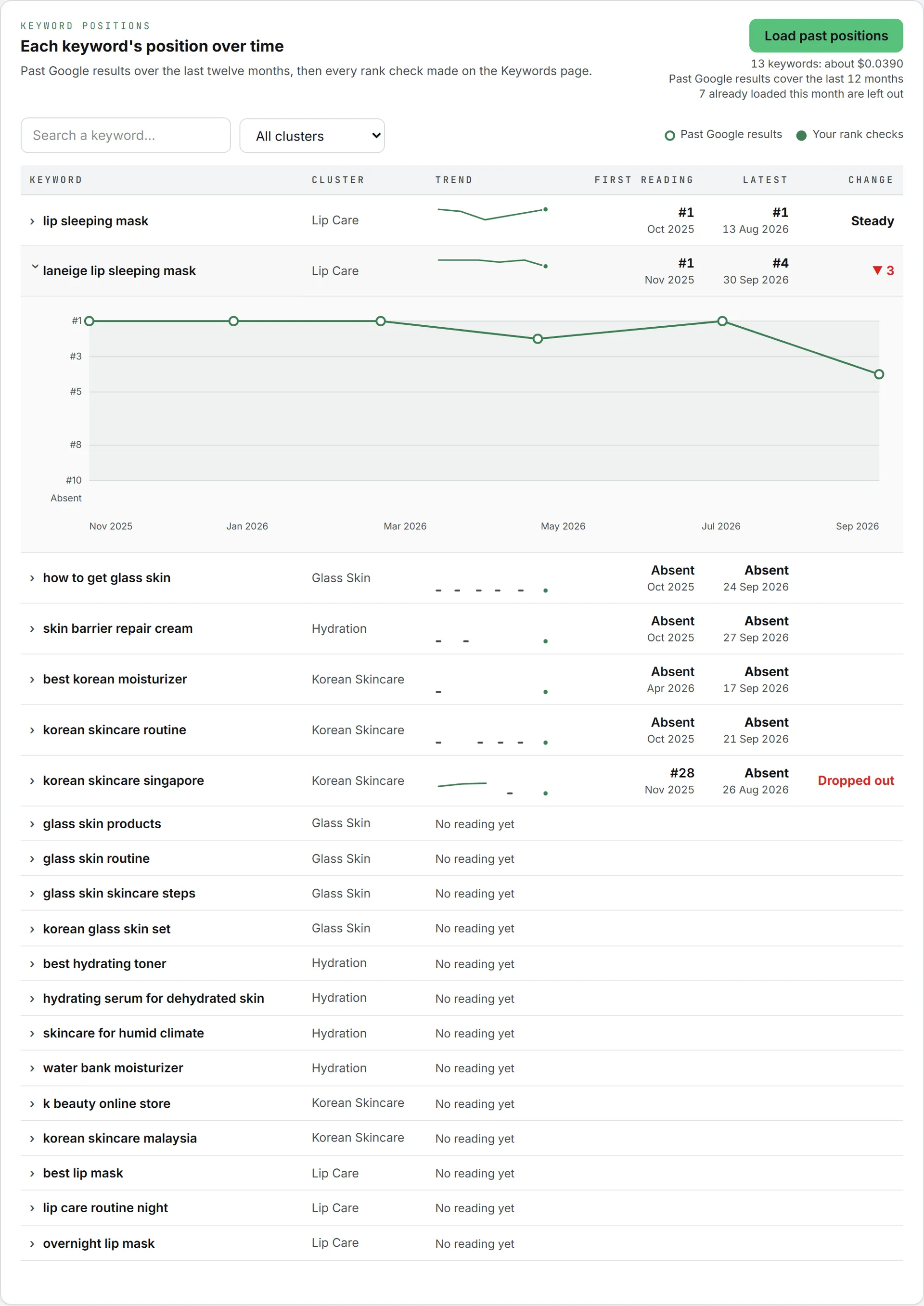
Readings come from two places, told apart by their marker:
- Past Google results (hollow points): Google results kept over the last twelve months, about one every one to two months. Click Load past positions to read them for the keywords shown. Search or pick a cluster first to load fewer.
- Your rank checks (filled points): every Rank or Rank all on the Keywords page now adds a point here, at no extra cost.
The price for the keywords shown appears under Load past positions before you click. Keywords loaded in the last 30 days are left out, and the price line says how many. One run reads up to 200 keywords.
Who can do this
Everyone in the organization with access to SEO can read what is loaded. Load this period and Load past positions need the editor role or higher, and don’t show for viewers. See roles and rights.
What it costs
Both loads are charged as data calls, from your credits:
- Site visibility: one charge per run, plus a small amount per month of the period. A shorter period costs less.
- Past positions: a small amount per keyword, depending on how many past results Google kept for it. A keyword with none costs nothing.
Each button shows its price before you click and the cost of the run once done, and each call is listed in your usage log. Changing the period, opening a chart and rank checks reaching the page are free. The app checks your credits and spending caps first; if they fall short, nothing runs. See credits and costs.
You can leave the page while a load runs: the Activity widget in the header follows it. See Activity.
Troubleshooting
- “This brand has no website set.” An admin fills in the brand’s website.
- “Google has not shown this website in enough results in this market to measure it month by month.” The site appears in too few searches in that country. Try the brand’s main market.
- A keyword says “No reading yet”. Load its past positions, or check its rank on the Keywords page. Past results exist only for searches Google records often enough.
- “No tracked keyword in this language.” Pick another language, or add keywords on the Keywords page.
- The site card stops at last month. That is expected: a month is measured once it is over.