Agents, skills, and formats
Agents run on a schedule, skills carry your instructions, formats define each kind of text. Here's how they fit with Ask Intelligence and the Playground.
Past the individual forms, Intelligence puts AI to work in a few more ways: agents, skills, and formats, plus two open-ended tools, Ask Intelligence and the Playground. They’re easy to confuse. This page sorts them out and ends with a table of which to use when.
The short version
An agent works on a schedule and reports what it finds. A skill is a set of written instructions the AI follows when it works for you. A format is a special skill that defines one kind of text, such as a press release or a LinkedIn post. Ask Intelligence answers your questions from your data when you ask. The Playground is a direct chat with a model that sees none of your data.
You’ll find them together in the header: Ask Intelligence, Playground, Agents, and Skills. On a small screen they move into the menu drawer. Formats live inside Skills.

Agents
An agent works in the background. It rereads a module’s data on a schedule, compares it with what it saw last time, and posts what changed and what to do about it. The app calls these posts findings. They land in the feed of the module the agent watches, and the Watchers dashboard under Business Intelligence gathers them in one place. You can acknowledge a finding, resolve it once it’s handled, or dismiss it as noise.
Not every agent posts findings. The weekly operating review and the executive report write a document instead.
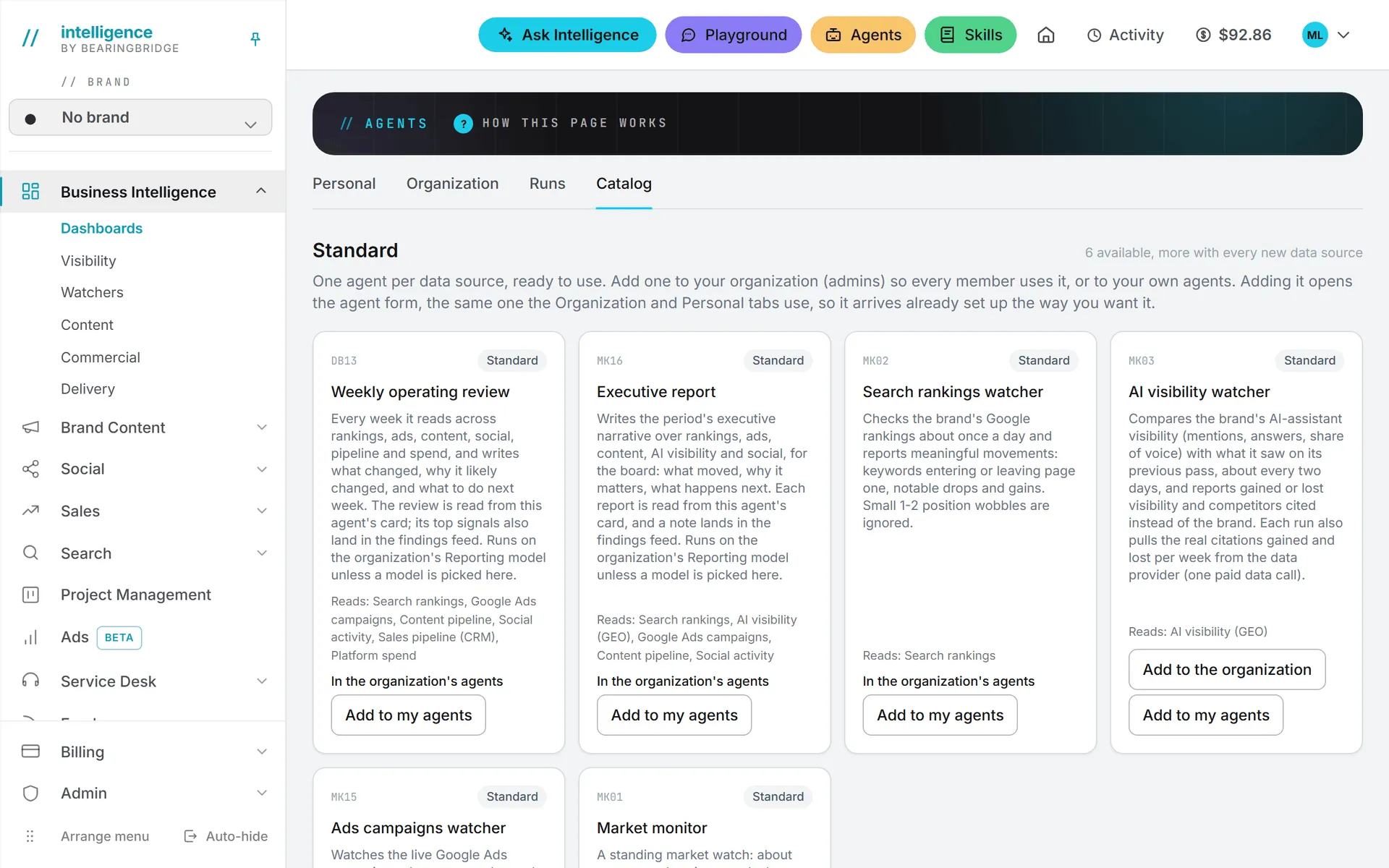
The Catalog tab of Agents holds two kinds of agents. The standard ones are:
- Search rankings watcher
- AI visibility watcher
- Ads campaigns watcher
- Market monitor
- Weekly operating review
- Executive report
The tailor-made ones are built by the BearingBridge team for one organization at a time, on request, around that organization’s own data and systems. Each card carries a contact link. See Catalog.
And if nothing in the catalog fits, you can create an agent from nothing. You pick the data it reads from a list of blocks, one per feature of the app you can see, and write its instructions yourself. See Custom agents.
Nothing runs until someone adds it
Agents are opt-in. The lists start empty. An administrator adds an agent to the organization from the Catalog, and from then on it runs for everyone. Members with editing rights can add an agent the organization already has to their own Personal agents and tune their copy. For anything else, the catalog sends the administrators a one-click request by email.
An agent can be set at three levels:
| Level | Who manages it | Whose money it spends |
|---|---|---|
| Organization | Administrators | The organization’s |
| Brand | Administrators and that brand’s brand managers | The organization’s |
| Personal | The person, or an administrator on their behalf | That person’s |
Each agent carries a name, a model, the data it reads, instructions, how often it runs (the minimum number of hours between two runs on a brand), a monthly and a weekly budget, and who hears about a run. Edit & test opens all of it, and Test run shows what the agent would report on one brand’s live data without posting anything.
If you’re new to agents, add one, give it a small monthly budget, and use Test run before letting it loose on a schedule. You’ll see what it reports and what a run costs before it runs on its own.
Budgets only get tighter as you go down. A brand or a person can lower what was set above them but never raise it, so the tightest budget in the chain is the one that counts.
An agent can read no brand (only the organization’s own data), one brand, or several at once; the Brands article explains the choice. A watcher only runs for brands that have its module switched on.
What an agent costs
A run that reaches the model is billed like any AI action, test runs included, and its cost shows on the Runs tab. A run that finds nothing new skips the model and costs nothing. When an agent uses up its monthly budget, it stops until the next month. After a scheduled run that produced something, a summary goes out by email with its cost and a link back to it. By default it goes to the organization’s administrators; an agent can name other recipients, or nobody. Manual and test runs send no email, since you’re already looking at the result.
Details are in Agents overview and Runs and schedules.
Skills
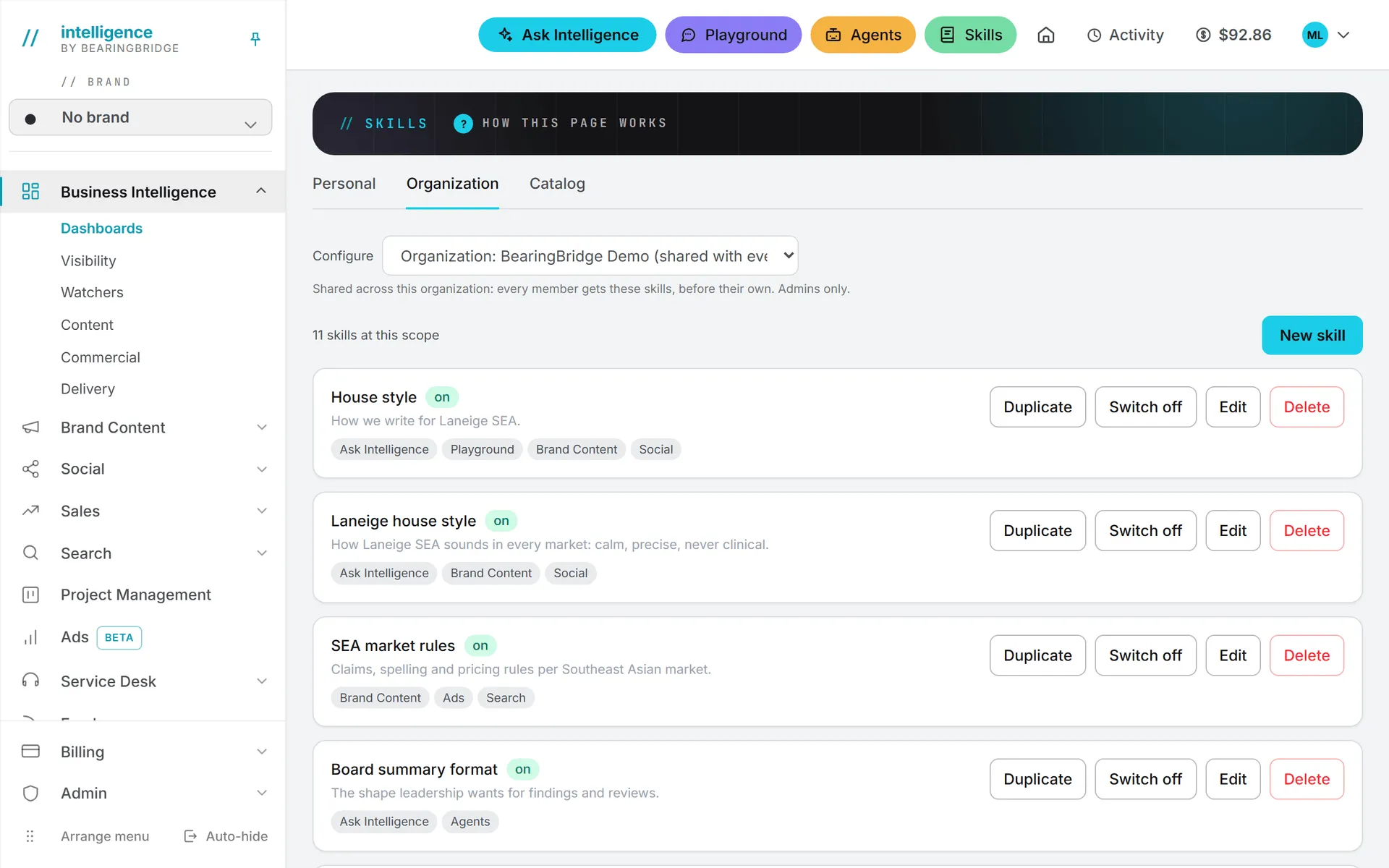
That covers agents. Now skills. A skill is a reusable set of instructions: a method, a checklist, a house style, a list of rules. Write it once and it rides along into AI calls, which saves pasting the same instructions into every prompt.
Skills live at two levels only. Organization skills are shared with everyone in the organization, and administrators write and manage them. Personal skills apply to your own runs, and you write them yourself, as long as your role can edit (viewers can read skills but not change them).
Note: There is no brand level for skills. A skill belongs to the organization or to a person, never to a brand.
On a run, the organization’s skills come first, then yours, and the AI follows all of them. If your personal skill has the same name as an organization skill, yours replaces it on your runs.
Each skill says where it applies: Ask Intelligence, the Playground, Agents, Brand Content, Social, Ads, Search, the CRM, the Service Desk, and Images and video (the Improve with AI button). A skill with nothing ticked is kept but never used.
When a skill applies
It depends on the screen, and this trips people up.
Forms that show a Skills to apply dropdown apply nothing by default. You tick the skills you want for that run. This is how Brand Content, Social, and the content plan work, and Ask Intelligence has the same choice behind its Use a skill button. Each dropdown has a Manage skills link, which opens the Skills page in a new tab so your form isn’t lost.
Everywhere else, every enabled skill for that surface applies on its own: agents, the Playground, ad copy, CRM quotes, the service desk assistant, and prompt rewriting for images and video.
Skills add words to every prompt they join, so they cost a few tokens per call. Keep them short and specific. Say what to do and what to avoid. A skill’s instructions can run to 8,000 characters, and at most 12 skills per level ride into one run.
Tip: Here’s the kind of skill an organization might write, called “House tone”: “Write in American English. Use short sentences and the active voice. Never promise results or quote prices. Refer to the company as ‘we,’ never by its legal name. End with one clear next step.”
The Catalog tab of Skills lists the standard skills the app ships with. An administrator adds one to the organization, and anyone can add a personal copy to edit. The Skills overview walks through writing one.
Formats
A format is a skill with a narrower job. It decides how one kind of text gets written. Every format under Brand Content > Text (a manifesto, a whitepaper, a press release, a landing page) has its own format skill. It’s the reason a whitepaper comes back argued and sourced, while a newsletter is written to be opened again next week.
Formats are edited in the Content Formats section of the Skills Catalog, for the organization or for yourself. Your version replaces the organization’s on your runs. Switch a format off and it disappears from the Text pages. Reset puts back the version the app ships with.
Social networks have format skills too, one per network, carrying that network’s posting rules. On a social form, the network’s own format skill is ticked for you. For LinkedIn and X, it also turns on a check: a draft that breaks the network’s rules (length, hashtags, links) is repaired before you see it. Untick it and the draft is written freely, with no check.
One difference from ordinary skills: they stack, but a format never does. Only one version of a format is in force at a time, and the closest one wins outright. That’s yours if you wrote one, otherwise the organization’s, otherwise the version that ships with the app. Formats covers the editing.
Ask Intelligence and the Playground
Ask Intelligence answers questions in your own words from the data you have access to: brands, search, ads, content, social, the service desk, tasks, the CRM, the Assets Library, and more, plus the systems your organization connected. It doesn’t read the agents’ findings and reports, the team list, the skills, or billing. It can also search the web when that’s allowed. See Ask Intelligence.
The Playground works the other way around. The model sees only the conversation, the files you attach, and your instructions. It’s the place to draft freely, test a prompt, or compare up to three models side by side. See Playground.
When to use which
The table below sums up the page.
| You want to | Use |
|---|---|
| Know when rankings, AI visibility, ads, or the market move, without checking | An agent |
| Get a weekly review or an executive report without asking | An agent |
| Make every AI run follow your house style or a checklist | A skill |
| Change how one kind of text, like a case study, is written | A format |
| Get an answer from your own data right now | Ask Intelligence |
| Try a model, draft freely, or compare models on the same prompt | The Playground |
| Write one post, article, or ad now | The form in that module, with the skills you tick |
They also work together. Say your organization writes a “House tone” skill and ticks Agents, Brand Content, and Social. The Search rankings watcher now explains its findings in that tone on its own. A person writing a case study ticks the skill in the form, and it rides on top of the case study format, which still decides the structure. If the skill also has the Playground ticked, it follows them there when they try out a headline.