Brand foundation and guidelines
Set how a brand sounds and looks: the Brand foundation formats, every guidelines field, AI drafting from a website or brand book, and the logo.
What a brand writes or renders in Intelligence rests on two things: its foundation copy and its guidelines. This page covers both. Brand managers set these up; writers work with the result every day.
Foundation copy or guidelines?
People mix these up all the time.
| Brand foundation page | Brand guidelines | |
|---|---|---|
| Where | Brand Content > Text > Brand foundation | The brand editor: Edit on a brand, sections Voice & tone and Visual identity |
| What it is | A copy studio that writes pieces: a manifesto, a brand story, an About page | A structured rulebook the AI follows on every run |
| Who uses the result | People, who publish or build on the copy | The AI, on every text and image run for the brand |
| Cost | Each run is paid; the price shows next to the version | Editing is free; drafting with AI is paid and recorded in the usage log |
A tone of voice guide written on the Brand foundation page doesn’t fill in the guidelines by itself. If you want the AI to follow it, copy what matters into the brand editor.
The Brand foundation page
The Brand foundation page is one of the five copy studios, the one for the pieces everything else is written from. It works like the other studios: pick a format, write the brief, choose where the run stops, run it, then refine the versions. The full workflow is in Copy studios.
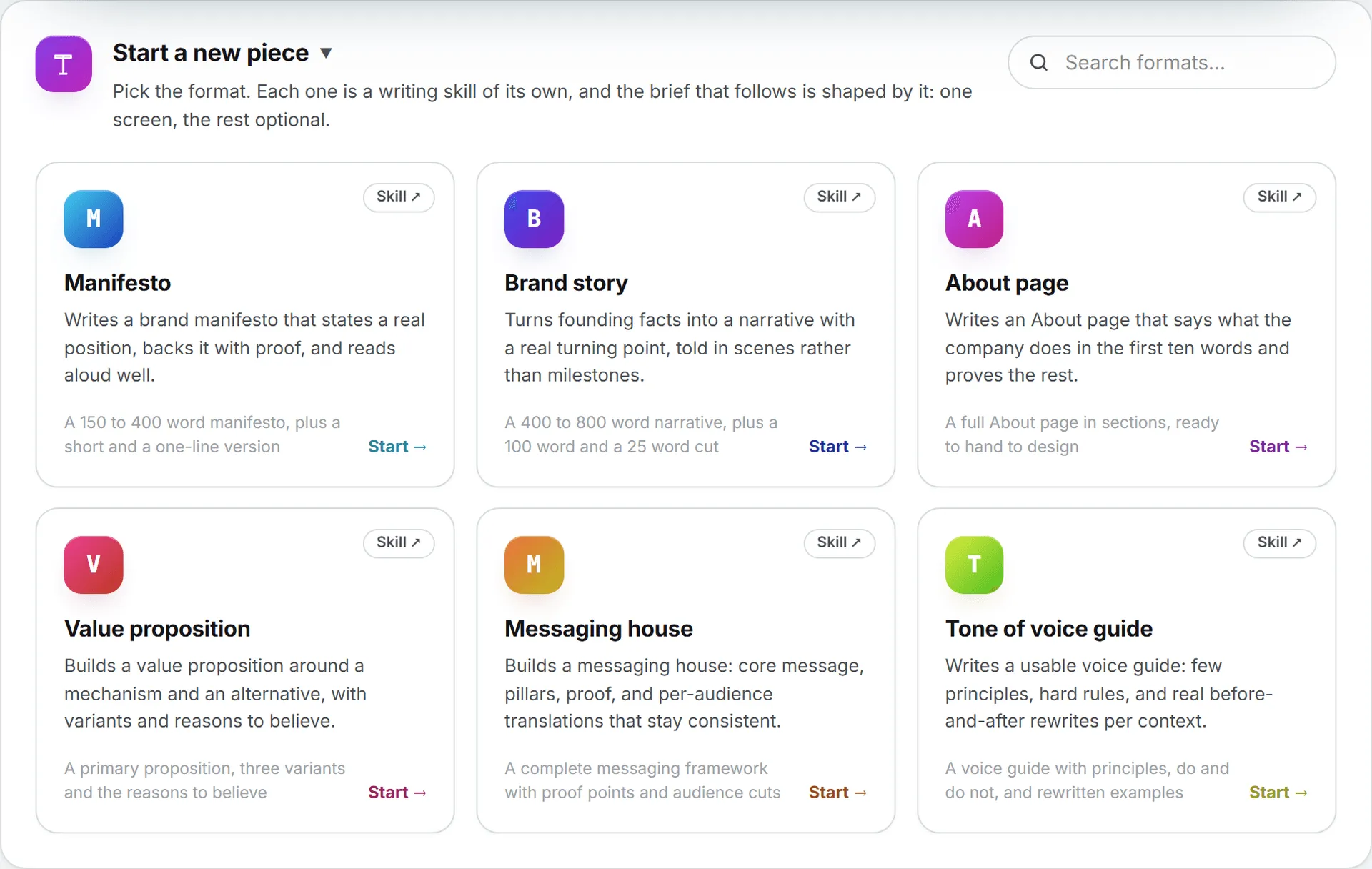
The seven formats
Fields marked “needed” must be filled before the run.
| Format | What one run produces | Needed | Other fields |
|---|---|---|---|
| Manifesto | A 150 to 400 word manifesto, plus a short and a one-line version | The belief | What it refuses, Proof it means it, Audience, Length |
| Brand story | A 400 to 800 word narrative, plus a 100 word and a 25 word cut | Origin | Turning point, Where it stands today, Audience, Register |
| About page | A full About page in sections, ready to hand to design | What the company does | Proof and numbers, People to feature, What the page should lead to, Audience |
| Value proposition | A primary proposition, three variants and the reasons to believe | The offer, Segment | The alternative, Why it wins, Reasons to believe |
| Messaging house | A complete messaging framework with proof points and audience cuts | The core message | Candidate pillars, Evidence available, Audiences to cut for |
| Tagline | Twenty candidate lines in territories, with a rationale and a shortlist | The idea to carry | Where it will be used, Territory to avoid, Must also work in |
| Tone of voice guide | A voice guide with principles, do and do not, and rewritten examples | Personality | Copy the brand already uses, Contexts to cover, Non-negotiables |
Length opens on No length set, which lets the piece run as long as it needs. The Manifesto offers Short (about 150 words), Standard (about 250 words) and Long (about 400 words).
Register offers Follow the brand guidelines, Warmer than usual, More formal than usual, Plain and factual and Bold and opinionated.
Each format follows its own built-in writing skill. The skills refuse generic category language and won’t invent facts, dates or numbers you didn’t give. When the brief leaves gaps, the writer lists what it needs in a To confirm note at the end, shown apart from the copy. Your organization can rewrite, rename or switch off any of these formats under Content formats.
Brand guidelines
Each brand has one guidelines document, in two halves: how it sounds and how it looks. The AI reads it on every run for that brand. You edit it in the brand editor, not on a Brand Content page.
Who can edit them
You need access to the brand and rights on Brands, which admins hold by default (Brands administration has the rest of the editor). Writers who can’t open the brand editor still benefit: the guidelines apply to their runs automatically.
Open the guidelines
- Open Brands from the administration menu, then click Edit on the brand’s card.
- In the editor’s side rail, pick Voice & tone or Visual identity.
- Fill in what you know. Every field is optional: an empty section is simply skipped when the AI reads the document.
- Click Save changes. The guidelines are saved with the brand, on the same button.
A brand that doesn’t exist yet can’t be drafted with AI. Save it once with Create brand, then come back.
The status strip
At the top of Voice & tone, a strip shows where the document stands. A chip reads approved or draft, not reviewed, and the Review status menu next to it switches between Draft and Approved. That status is a label for your team: draft guidelines are applied exactly like approved ones.
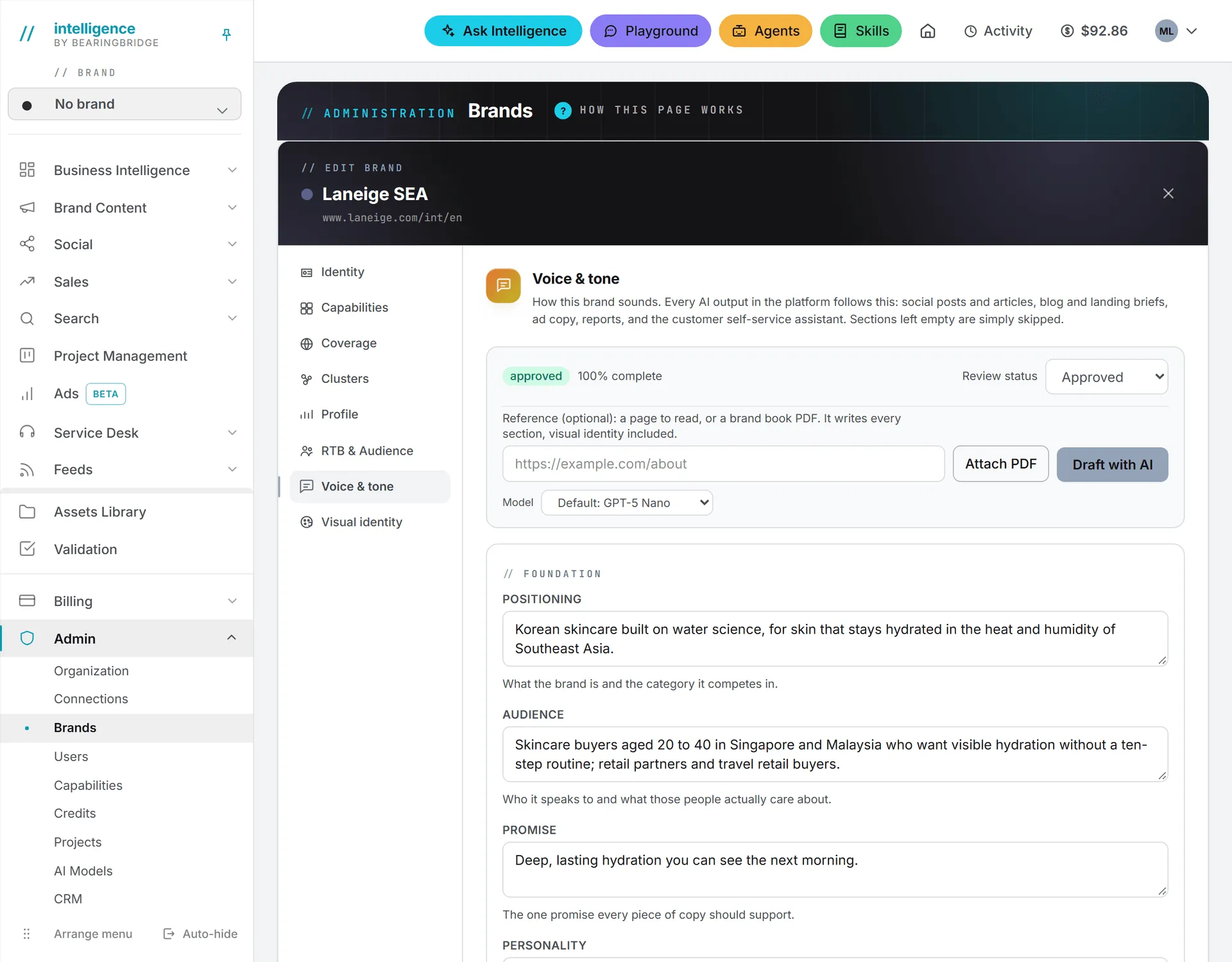
The strip also shows a completeness figure, such as “62% complete”. It’s the share of the 13 voice sections that carry something: positioning, audience, promise, personality, traits, tone, the three vocabulary lists, grammar, claims and the two example lists. Visual identity has its own figure, counted on five sections (palette, logo, typography, imagery style and the imagery rules). Both update as you type.
Voice & tone fields
What follows is a field-by-field reference; skim it now and come back when you fill the form. The editor groups the voice fields in six blocks.
Foundation
| Field | What to write |
|---|---|
| Positioning | What the brand is and the category it competes in |
| Audience | Who it speaks to and what those people actually care about |
| Promise | The one promise every piece of copy should support |
| Personality | The brand as a person, in one short paragraph |
Voice traits
Three to five traits. More than five and nobody, human or AI, keeps them all in mind. Each row has three boxes: the trait (for example “Precise”), what writing like this looks like, and what it must not turn into (for example “Not cold, not academic”). Add trait adds a row; the cross removes one.
Tone by context
The same brand isn’t written the same way in an ad and in a support reply. Each generator reads the line for its own context.
| Context | Used for |
|---|---|
| Social post | LinkedIn posts and short updates |
| Article | Blog articles, LinkedIn articles, long form |
| Ad copy | Google and LinkedIn ads, headlines, landing copy |
| Newsletters and outbound email | |
| Service Desk | Support replies and the self-service assistant |
| Report | Executive reports, reviews, client-facing documents |
Vocabulary and rules
Three lists, one item per line: Prefer (words and phrases the brand uses), Avoid (words and patterns to steer away from) and Never use (hard bans, never in any output). Then two text fields: Grammar and formatting (person, tense, capitalization, punctuation, emoji policy, formatting habits) and Claims and proof (how claims are backed, and what may never be claimed).
Examples
Two lists, one line each: Sounds like the brand and Does not sound like the brand. Real lines teach a voice faster than adjectives do.
Anything else
Additional rules takes Markdown: legal wording, product naming, market-specific rules. It’s passed to the AI as written.
Visual identity fields
| Block | Fields |
|---|---|
| Palette | One row per color: name, hex code (like #1B4DFF) and where it’s used. Add color adds a row. |
| Marks and type | Logo (usage, clear space, what’s never done to it) and Typography (typeface direction and hierarchy) |
| Imagery | Imagery style (photography and illustration direction), Imagery must and Imagery must never, one item per line |
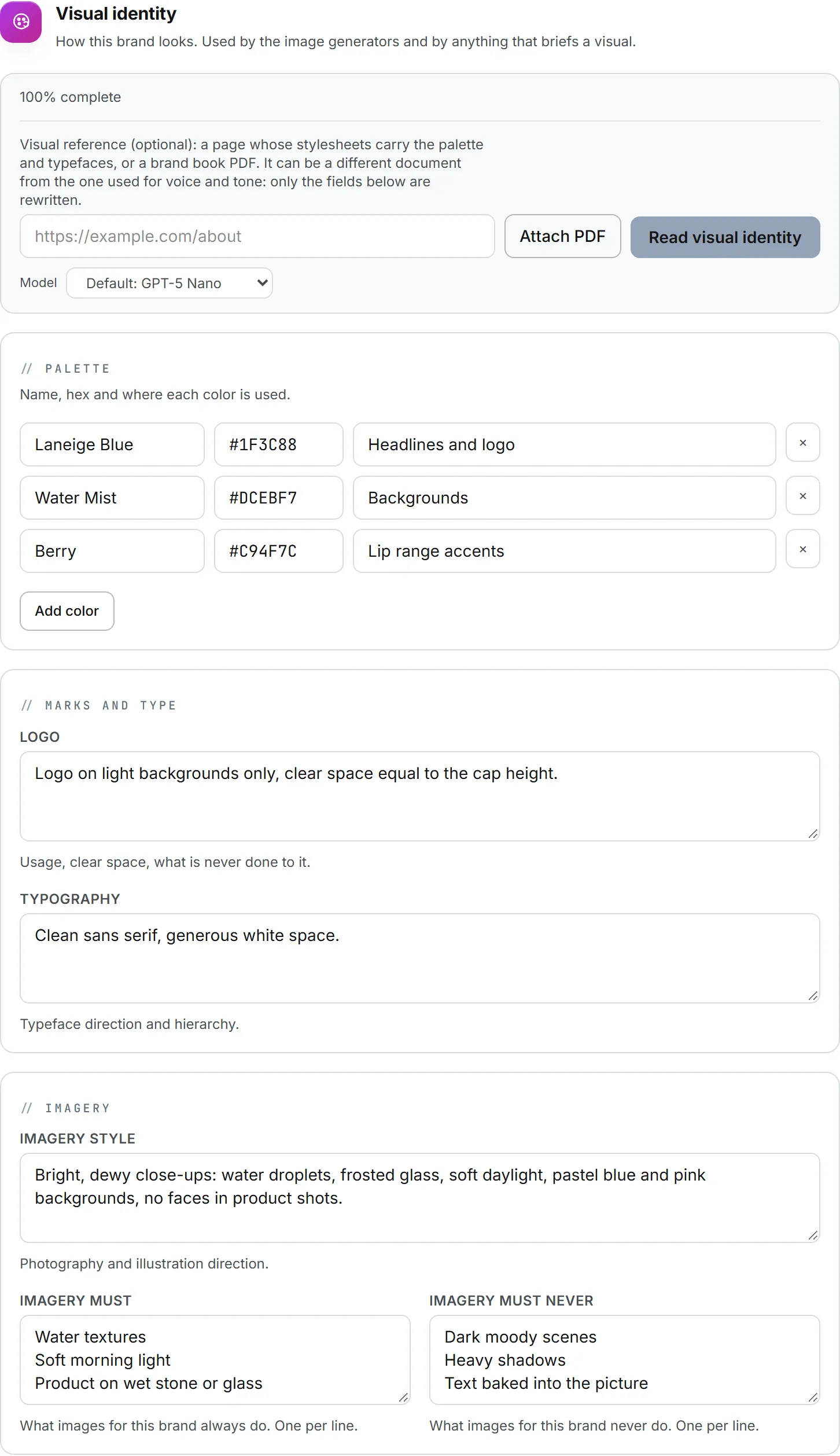
The visual identity is what the image generators follow. Text generators also receive it as context when they brief a visual.
Draft the guidelines with AI
That’s a lot of fields. Each half of the guidelines has a drafting bar that writes a first version for you.
| Button | Where | What it fills |
|---|---|---|
| Draft with AI | The status strip, top of Voice & tone | Every section, visual identity included |
| Read visual identity | Top of Visual identity | Only the palette, logo, typography and imagery fields. The voice sections are left exactly as they are. |
The two bars take separate references on purpose. The voice is easiest to find on the website or the About page. The look tends to be in a brand book.
Tip: One order that works well: run Draft with AI on the brand’s About page first, then Read visual identity on its brand book PDF. The second run leaves the voice you just reviewed untouched.
Step by step
- In the bar, type a web address in the reference box, or click Attach PDF to add a brand book. The PDF can be up to 20 MB.
- Pick a model under the bar if your organization offers more than one.
- Click Draft with AI or Read visual identity.
- Wait for the draft; brand books take the longest. It fills the fields on screen and a message says what it read.
- Review every section, change what’s wrong, then click Save changes. Don’t like it? Close the editor without saving.
Nothing is saved until you save the brand. Close the editor without saving and the draft is gone, though the run has already been charged.
What the draft reads
Draft with AI works from:
- the reference you gave, which counts as the strongest evidence;
- the brand’s profile from the editor: website, target customers, precise targeting, reason to believe, email audience, topic clusters and languages;
- up to eight approved or published social posts and five accepted articles of the brand (drafts are ignored);
- a voice profile learned from the brand’s approved content, if one exists for the brand;
- whatever you already wrote in the guidelines. A redraft refines your decisions rather than overwriting them.
The reference is optional for Draft with AI. Read visual identity needs one: a page address or a brand book PDF. Only the first 20,000 characters of a reference’s text are read, along with the colors and fonts measured on it. The text taken from a very long brand book is capped there.
The AI is told never to invent facts. When the material doesn’t state a palette or a typeface, the field stays empty instead of being guessed.
How the look is read from a reference
Read as plain text, a website or a brand book loses its colors and fonts. So the reference is read a second time, for its look.
On a web page, that means the colors used in the page and in up to eight of its stylesheets, ranked by how often they appear, plus the font families it declares, the web fonts it actually loads and its logo image files. Near-white and near-black are left out. On a PDF, it’s the fill colors and embedded font names on the first 15 pages.
Every color and typeface reported is one that actually appears in the source. A site that draws itself entirely with scripts yields little, and a scanned brand book has no text to read. When no palette or typeface could be measured, the message says so and you fill those fields by hand.
Errors you might see
| Message | What to do |
|---|---|
| Only a PDF can be attached as a reference. | Export the brand book as PDF, or give a page address instead. |
| That PDF is too large (20 MB max). | Keep the pages that show the palette, type and logo, and attach that. |
| No readable text found on that page. | The page is empty to a reader, often because it’s built by scripts. Try another page, such as About. |
| A visual draft needs a reference: a page URL or a brand book PDF. | Read visual identity can’t run on the profile alone. Add a reference. |
| No guidelines came back. Please try again. | Run it again. |
Where the guidelines are used
Every text run for the brand appends the guidelines to its instructions: Text copy, articles, landing page briefs, social posts, ad copy, reports and the Service Desk assistant. Only one Tone by context line rides along, the one for that run’s context. A press release or a whitepaper reads Report, a landing page or a brochure reads Ad copy, a newsletter reads Email, an FAQ reads Service Desk, and most editorial formats read Article. Fill all six and every run gets the right one. On the Text pages and the article workspace, the Follow the brand guidelines checkbox lets you leave them out of a single run.
Image generation adds the visual identity to text-to-image renders, through the Apply the active brand’s visual identity checkbox, which is on by default. An edit or an upscale follows its source picture instead; the details are in Images.
In the article workspace, Check guidelines scores an article version against the document and lists each breach.
When a brand has no guidelines
If a brand’s guidelines are empty, runs fall back on a voice profile learned from the brand’s approved content, when one exists. With neither, runs still go ahead, just without brand rules.
On social posts, a voice score can compare a draft against the guidelines or that learned profile. With neither, it answers that there’s nothing to score against yet (Writing posts covers the score).
The brand logo
The logo is set in the brand editor, in the Identity section, in the Brand logo field.
- Click Choose image. PNG, JPEG or WebP, 2 MB max. SVG isn’t accepted.
- The editor shrinks large images before upload. The file is uploaded when you save the brand.
- Remove takes it off; the brand falls back to its color dot.
The logo replaces the color dot in the brand bar, brand lists and task cards. It also heads the PDFs exported from Brand Content. PDFs can only embed PNG and JPEG, so with a WebP logo, or one that can’t be fetched, the PDF prints the brand name instead.
Writing to a publication’s house style
A blog or a trade magazine also has habits of its own, which the guidelines can’t know about. For that, the copy studios offer Where it will be published, under More context: give it the blog or site a piece is going to, and the run reads that page and up to two articles on it to copy their shape, never their facts. Details are in Copy studios.
What it costs
Editing and saving the guidelines is free. Draft with AI and Read visual identity are paid AI runs on the models offered for Brand foundation. The editor doesn’t show their price, but each run appears in your usage log.
Every Brand foundation copy run is paid too, and shows its tokens and price next to the version. Earlier versions of the same format give you a fair idea of the next one.
How credits and caps work is covered in credits and costs.
Tips for guidelines that work
- Guidelines belong to one brand. A second brand needs its own.
- Changing the guidelines doesn’t touch pieces already written. Only the runs that follow use the new version.
- A half-filled document is still useful: empty sections print nothing.
- Keep Never use short and strict. It’s applied to every output, from ads to support replies, so a word banned for ads is also banned in a support answer.