What runs by itself
What spends credits with nobody signed in: scheduled agents, posts on X, a public service desk, daily storage rent and automatic top-up, and every brake.
Most of what you spend in Intelligence, you spend on purpose. You press a button and a run starts. But a few things keep working when nobody is signed in, and those are the ones that turn up as a surprise at the end of the month. This page lists every one of them, what each can spend, and the brake you can put on it. It is for whoever watches the balance, usually an admin or the person who bought the credits. Credits and costs explains the balances these runs draw on.
What keeps running
Seven things. Six of them cost something.
| What | When | Can it spend | Your brake |
|---|---|---|---|
| Scheduled agents | Checked once a day | Yes, AI runs | A monthly and a weekly budget per agent |
| Scheduled social posts | The queue is checked every five minutes | Only posts sent to X | Unschedule the post |
| A service desk answering the public | Whenever a visitor asks something | Yes, AI runs | A daily budget per desk |
| A website linked to a service desk | Read again nightly | Yes, indexing what changed | Untick Read it again every night |
| Storage rent | Once a day | Yes, by the size of what you keep | Delete what you do not need |
| Automatic top-up | When a balance falls under your threshold | Yes, it charges your card | A daily ceiling, and an off switch |
| Task reminders and the weekly digest | Daily, and Mondays for the digest | No, email only | Both can be switched off |
The last row is there for completeness. Reminders about open tasks go out daily, the digest of product changes goes out on Mondays, and neither costs anything. Both are covered in emails and notifications.
Scheduled agents
An agent set to run on its own is checked once a day and starts when it is due. In practice that means an agent runs at most once a day, even when its interval is shorter, and a due run can start a little later than the interval suggests. It reads what it is pointed at, writes its findings or its report, and the run is billed like any other AI work. Nobody has to be signed in.
Each agent carries two budgets, monthly and weekly. An agent that has used its budget is skipped, and the others still run. A run that starts under budget finishes even if it crosses the line; the next one is blocked. The card shows what the agent spent this month and over the last seven days, which is the number to size a budget from. See runs and schedules.
To stop one, pause it or turn its schedule off. There is no switch that stops them all at once, so they go one at a time.
What it can add up to
There is no flat price per run, so nobody can tell you in advance what a month of unattended work costs. What you can do is read it backward. Open the usage log, look at a full month, and find the lines that nobody was sitting at a keyboard for: agent runs, desk answers, the indexing of a linked website, File storage (daily), and posts to X. That figure is your baseline, and it is the number to size every budget on this page from.
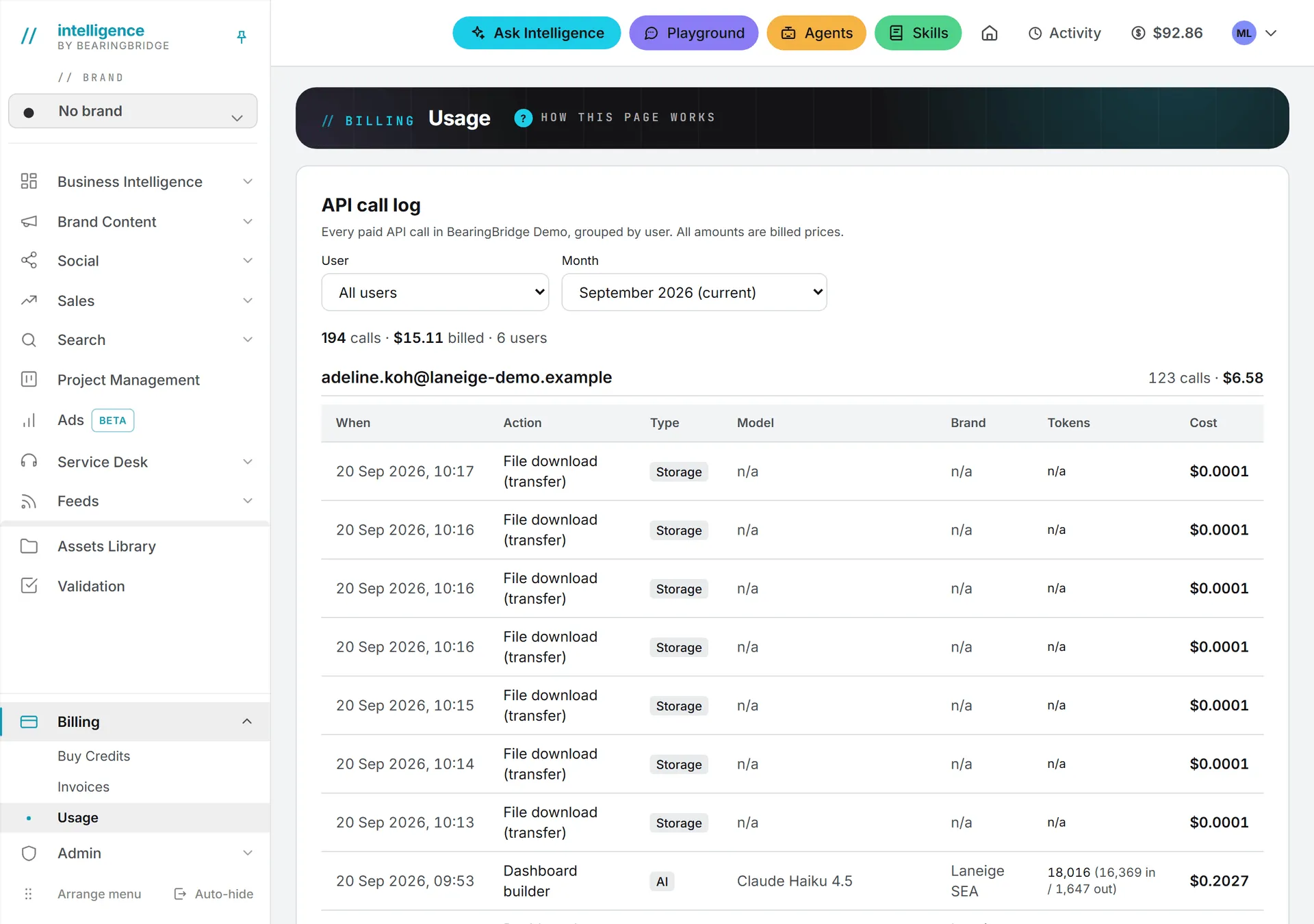
Do that once after your first month, then again after you switch on a new agent or a new desk. See what costs credits for the wider picture, and shared credits for how a member’s spending draws on the organization’s balance.
Scheduled social posts
The queue is checked every five minutes. A post set for 09:00 goes out between 09:00 and 09:05. Publishing itself is free on LinkedIn, Facebook, Instagram and TikTok.
X is the exception. X charges for every post sent through its service, so each one takes credits, and a post carrying a link costs more than one without. The publishing step shows the price before you schedule anything, so you know the cost before you commit to it. A thread is billed per post that reaches X. A refused send costs nothing. And if the balance cannot cover the charge, the post is not lost. It waits, and it goes once you top up. See publishing and X.
A service desk answering the public
Important: A live desk is the one place where people outside your organization spend your credits. Every answer a visitor gets is an AI run paid from the organization’s balance, never from anyone’s personal one, and nobody on your side has to be signed in.
A live desk answers visitors at any hour. That is the whole point of a desk. It is also the line in a usage log that makes people blink the first time they read one.
Two things hold a desk down. Each desk has a daily budget, ten US dollars unless you change it, counted from midnight UTC and covering answers to customers only; your own tests and the indexing of documents do not count toward it. Past the budget, the public page stops answering and offers your contact options instead. And at zero credits the desk does the same. See conversations and costs.
A website linked to a service desk
A desk can answer from a whole website, and a linked website is read again every night. Only what changed is indexed: a page whose text is word for word what it was last time is fetched and then left alone, so a settled site costs almost nothing night after night. A site that publishes every day costs a little every day.
Read it again every night is a tick box on the website’s row in the desk’s Knowledge step. Untick it and the site is only read when someone presses Sync now. The nightly pass is quiet: it opens no job in the Activity panel, and the row’s “read [date]” is how you tell it ran. See answer from your whole website.
Those four are the AI spenders. The last two are quieter.
Daily storage rent
Files you keep carry rent, charged once a day to the organization as a whole, or to a personal account’s own balance. It appears in the usage log as File storage (daily), with no member attached.
Rent is the one charge that keeps going on an empty balance, which is how a balance ends up slightly below zero. New uploads are refused before that happens, so the bill cannot keep growing. See storage costs.
Automatic top-up
Everything else on this page spends credits. This one spends money. When a balance falls under the threshold you set, a saved card is charged for the amount you chose, and the credits land straight away.
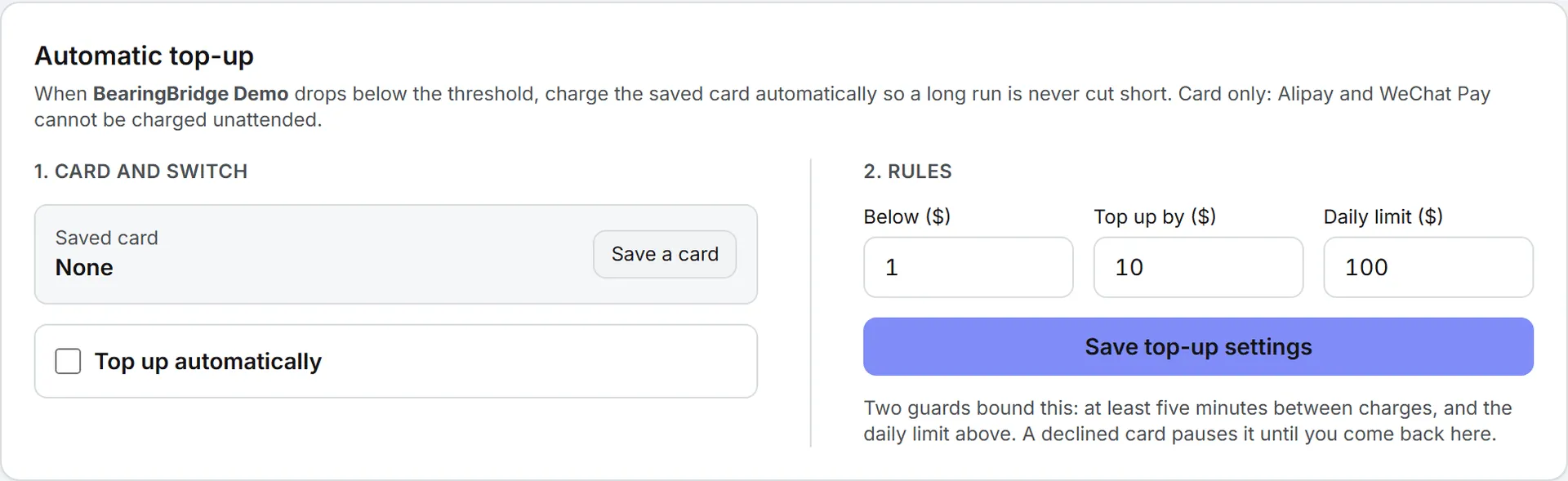
Three limits sit around it. Two automatic charges are always at least five minutes apart. A daily ceiling you set caps the total it can charge in one day. And it pauses itself whenever a charge is declined or your bank wants approval. That daily ceiling exists for the worst case, an agent stuck in a loop: it can burn through credits, but it cannot keep charging the card. Every automatic purchase is final, like any other. See automatic top-up.
Note: Automatic top-up also silences the low-credit email. The product only warns you that a balance dropped under $5 when top-up is off, because with it on the balance is not supposed to get there.
How you find out
Most of it tells you. Storage rent is the exception: it is charged every day without a word, and you find it in the usage log.
- A scheduled agent run that produced something sends an email to the organization’s admins, or to the owner of a personal brand, or to an address list you choose. You can switch it to nothing, or to a link instead of the full report.
- A scheduled post that failed for good sends an email to whoever queued it and to the admins.
- A social account that expired, or expires within seven days, sends a reconnect notice.
- A balance crossing under $5 sends a low-credit email to the admins and the billing address, unless automatic top-up is on.
- Every run of every kind lands in the usage log with its price, month by month.
Runs that finished while you were away also wait for you in the Activity panel in the header, with a badge on the button. See activity.
The full list of what the product mails you, and what you can turn off, is in emails and notifications.
What does not run by itself
So you do not go hunting for a schedule that is not there:
- Feeds are refetched when you open the reader and when you press Refresh. There is no timed refresh, and no AI runs on a refresh. See feeds.
- A desk’s documents, web pages and library folders never sync on their own. Someone presses Sync now. A linked website is the one exception, and it is covered above.
- Articles, images, videos, copy, keyword refreshes and reports all wait for a person to start them.
One nuance on that last point. A long job you started yourself, such as an outline or a batch of ranking checks, can be finished later by the same daily pass that runs the agents. It is your job, started by you, simply completed in the background rather than abandoned.
Who can set the brakes
An agent’s budgets are set where the agent is, so whoever can edit that agent can change them. A desk’s daily budget and its nightly website reads live in the desk’s settings and its Knowledge step, which need editor rights or above. Automatic top-up is set on the page where credits are bought, on the balance it protects: your own, or the organization’s if you are an admin.
If you want everything to stop
Work down the list. Pause every agent. Unschedule the posts still in the queue. Switch each live desk off, and untick the nightly read on every linked website. Turn automatic top-up off. Storage rent keeps running as long as files are stored, so delete what you no longer need. After that, nothing moves until somebody presses something. Pausing an agent does not delete what it already found, so you can stop the spending without losing the work.