What costs credits
AI text, images, video, live search data, file storage and posts on X cost credits. Viewing and managing your data is free. See both lists.
Some actions in Intelligence call a service that charges for each use: an AI model, a search data source, file storage, or X’s publishing service. Those actions take credits off your balance.
Tip: In short, you pay when something is generated, looked up live, stored, downloaded or posted on X. Working with what you already have is free.
Where you see the price
| Where | What it shows |
|---|---|
| On each paid result | What that action cost. |
| The amount in the top bar | Drops by the price for a moment, for example ”-$0.04”, after each paid action. |
| The publishing step for X | The price of the send, before you press anything. |
| A service desk’s knowledge base | The price of each indexing, including each page read from a linked website. |
| The Usage log | Every paid action of the month, with its price. |
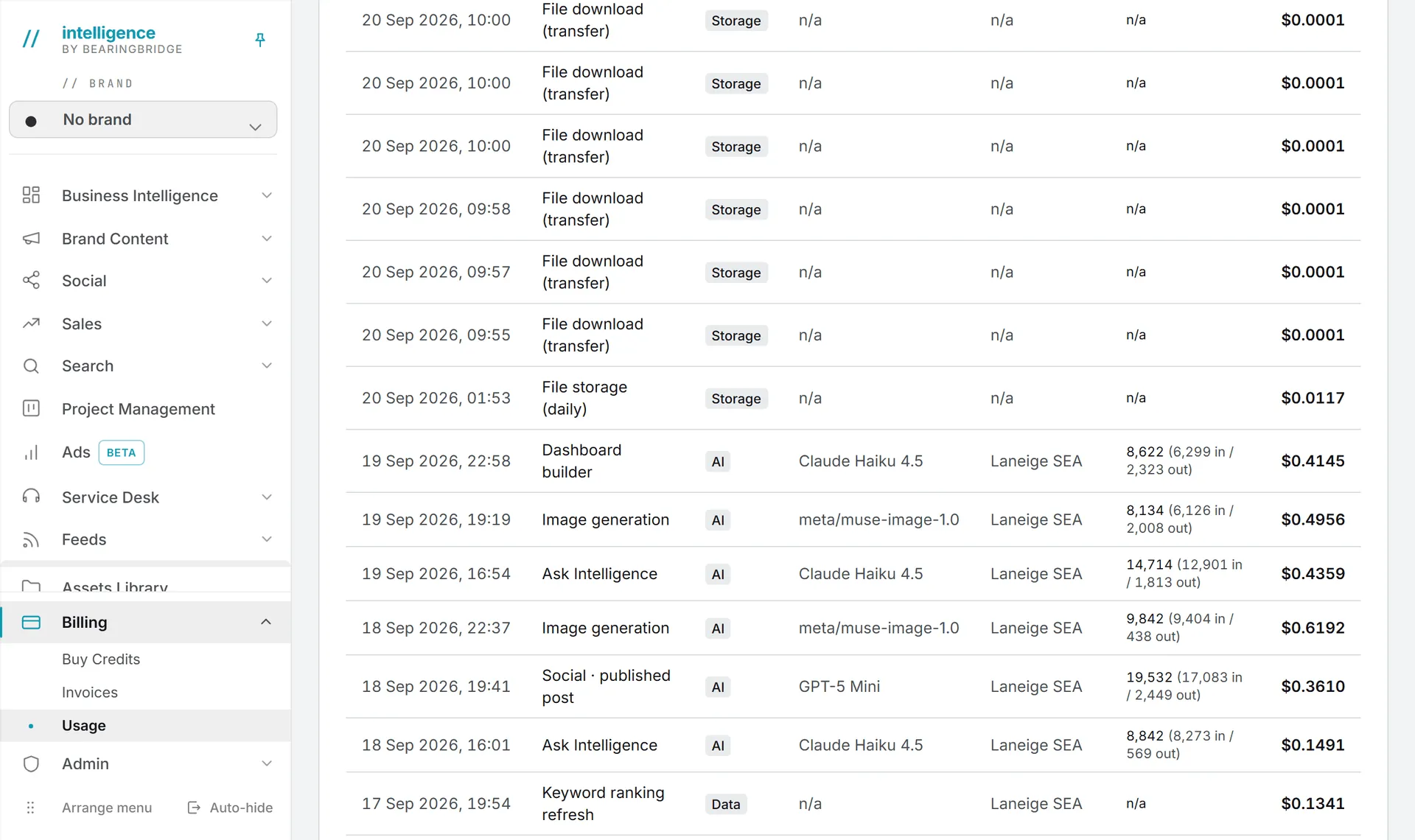
There’s no fixed price list: a price depends on the model and the size of the job. To estimate a run, look at what a similar one cost you in the Usage log.
What costs credits
AI text
Every call to an AI text model costs something. The price depends on the model you pick and on how much text goes in and comes out, so a long document or a large model costs more. Admins choose which models each feature offers; see AI models. Paid text calls include:
- Ask Intelligence questions and Playground messages.
- Each build, refresh or update of a dashboard you built, billed like an Ask Intelligence question.
- The copy studios: generating, continuing, rewriting a selection, improving a prompt.
- Articles: outlines, writing, drafts and repurposing.
- Content plans and content briefs.
- Brand foundation: brand guidelines and brand voice.
- Social posts: drafts, versions, voice, TikTok briefs and visual prompts.
- Sales: quote drafts in the CRM.
- Ads: keyword suggestions, keyword selection, negative keywords and ad copy.
- Search: the AI keyword deep dive.
- Service desks: answers, desk tests, knowledge base indexing and the nightly read of a linked website.
- Agents: every run, scheduled, manual or test, and actions on agent findings.
Images and video
You pay for each image or video you generate, in the image and video studios and for the visuals and clips of social posts. Higher quality, longer clips and more results cost more, and so does a pricier model.
Search and AI search data
Live search data is paid per request:
- SERP refreshes and keyword ranking refreshes.
- Keyword gap and search volume lookups.
- AI search (GEO): brand mentions, AI responses, AI search results, AI search volume and the other GEO reports.
Feeds without RSS
A feed that follows a page with no RSS or Atom feed is built by AI once, which is paid. So is Learn again with AI, when the page changed shape. Later refreshes of that feed are free.
File storage and downloads
Files you keep cost a small rent every day. That covers the Assets Library and the Playground’s attachments and generated files. Profile pictures and brand logos are free.
Downloading a stored file is paid too, by its size, and the Usage log lists it as File download (transfer). That includes opening a file from the Assets Library or the Playground, previewing a file in Validation, reading a library folder as context for AI, and sending a file to a video render. See storage costs.
Publishing on X
X charges for every post sent through its service, so each one costs credits. A post with a link costs more than one without. A thread is billed per post that reaches X, and a refused send costs nothing. The X article covers the publishing step.
What is free
The free side is simpler:
- Opening pages, dashboards, reports and data you already have.
- The CRM, the project boards and tasks. Only AI drafts cost credits.
- Uploading a file. Rent starts once it’s stored.
- Validation, except previews, which count as downloads.
- Publishing on LinkedIn, Facebook, Instagram and TikTok.
- Refreshing feeds that have their own RSS or Atom feed.
- Managing users and brands, and changing settings.
Which credits pay
Your paid actions come from the shared credits first, within your daily allowance, then from your own credits. Downloads count as yours, like any other action.
Two kinds of spending belong to the organization instead. A service desk answering the public is paid from the organization’s credits, never from anyone’s own (more in service desk costs). Storage rent is charged to the organization once a day; a personal account pays it from its own credits. Agents also carry weekly and monthly budgets of their own, on top of all this, as agent runs and schedules explains.
Some of this spending happens with nobody signed in: scheduled agents, posts sent to X, a desk answering the public and the daily storage rent. What runs by itself lists them and the brake on each.
Credits and costs covers the two balances, the daily allowance and what happens when a balance reaches zero: AI features switch off, new uploads are refused, service desks stop answering, and everything else keeps working.