Conversations
Every Ask Intelligence conversation is saved for you alone. Find it again, rename or delete it, and pick up the thread with its settings intact.
Ask Intelligence keeps every conversation you have with it. Close the tab today and open the page on another computer tomorrow: the thread is still there.
This is for anyone who uses Ask Intelligence and wants to get back to an earlier answer.
How conversations are saved
A conversation is saved on the server as soon as its first answer comes back. Every question and answer after that joins it as you go. There’s no Save button.
A conversation belongs to the person who had it. Nobody else sees it, administrators included.
Its first title is your first question, cut at 120 characters. You can rename it at any time.
Find a past conversation
- Click Previous conversations in the dark band at the top of the page. The number next to it is how many conversations you have.
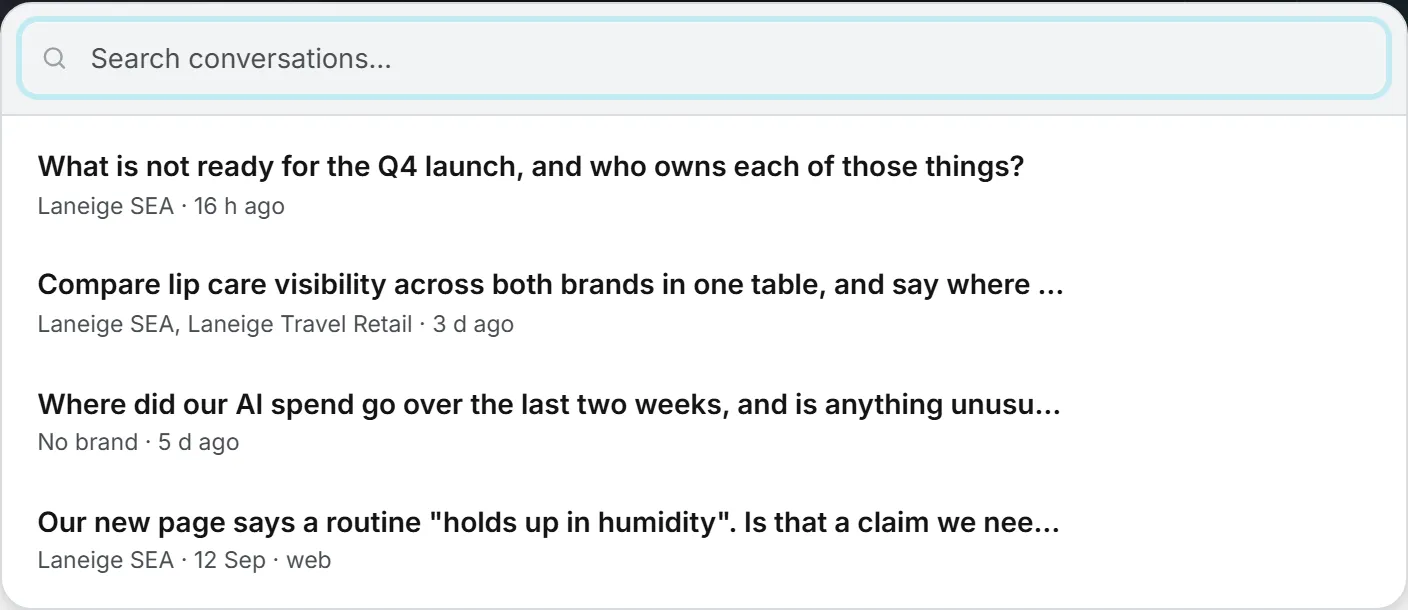
- Type a few words in Search conversations… to filter the list. It matches titles, not the text of the answers, so rename a conversation you’ll want to find again.
- Click a conversation to open it.
The list shows your 100 most recent conversations, newest first, whatever brands they read. Older ones stay saved but drop off the list. Under each title, a small line tells you:
- the brands it reads: “No brand”, the brand names, or “3 brands” when there are more than two;
- when you last used it: “just now”, “12 min ago”, “5 h ago”, “2 d ago”, then the date after a week;
- “web” when web search is on for it.
The conversation on screen is highlighted in the list. Its title also shows at the right of the toolbar.
Open, rename or delete
Hover over a line in the list to see its three buttons. On a touch screen they’re always shown.
| Button | What it does |
|---|---|
| Open | Loads the conversation, the same as clicking its title. |
| Rename | Opens a small Conversation title box. Type the new title, up to 120 characters, and confirm. |
| Delete | Asks you to confirm, then removes the conversation for good. |
Important: Deleting cannot be undone. There is no trash to restore a conversation from.
If you delete the conversation that is on screen, the page clears and you start a new one. Deleting doesn’t change what the conversation cost: its charges stay in your usage log.
What comes back when you reopen one
Nothing is lost in between. Reopening a conversation shows it exactly as you saw it when it was answered. Every question and answer is there, with its Based on: line, the web pages it used and what each answer cost.
Its settings come back with it. The brands it reads are picked again, Data included shows the choice you made for it, and the Web search switch is where you left it.
Reopening a conversation costs nothing. Only a new question does, at the price shown under its answer. See Credits and costs.
Keep going or start over
Type a follow-up in the box and Ask answers it with the earlier turns in mind. Use that to narrow a question or to push back on an answer.
When a follow-up needs figures, Ask reads your data again instead of relying on what it said earlier. That’s why a follow-up sent the next day works on that day’s data.
Changing brands does not start a new conversation. Click New conversation to start a fresh thread. The conversation on screen stays in the list. In the new one, Data included goes back to everything. Your brand choice and the web search switch stay as they were.
If you change the brands, the data included or the web search switch in the middle of a conversation, the change is saved with it (see Data, brands and web search). The next question uses the new choice.
Link straight to a conversation
The address of the page carries the conversation you are in, for example /ask#chat= followed by a code. Bookmark it, or reload the page, and you land on the same conversation.
The link only works for you. If someone else opens it, they get “Conversation not found.” To share an answer with a colleague, copy its text into a message or a document.
Limits, and what changes over time
A conversation keeps its last 40 questions and answers. When it writes a new answer, Ask reads back the last 10 of them. Those earlier turns are sent back to the model with every follow-up, so an answer late in a long thread uses more tokens and costs a little more than the same question asked fresh. On a very long thread, a new conversation that starts with a short recap usually works better.
Things can change after a conversation. If you no longer have access to one of its brands, reopening it leaves that brand out. If your organization turned web search off since, the switch comes back off.
The Viewer role is read-only, so a viewer can open the page but can’t ask, rename or delete. See roles and rights.
Troubleshooting
The list is empty. You haven’t had a conversation yet, or you deleted them. Conversations are personal, so you never see a colleague’s.
A conversation won’t open. It may have been deleted in another tab. Close Previous conversations and open it again: the list reloads each time it opens.