Audio briefing
Your agents' findings and your dashboards' figures, written into a spoken briefing on your schedule and published to a private podcast only you can follow.
The audio briefing reads to you what your agents found and the figures of the dashboards you pick. A short script is written from them, a voice reads it, and the episode lands in your own private podcast, which you follow in Apple Podcasts, Overcast, Pocket Casts or any podcast app. It’s yours alone: nobody else in your organization sees it, hears it or can set it.
Switch it on
Open Agents, then Personal. The Audio briefing card sits at the top. Turn on Make my audio briefing, choose the rest, then click Save. The Save button turns amber as soon as something changes. Your private podcast and its address are made when you first save it switched on.
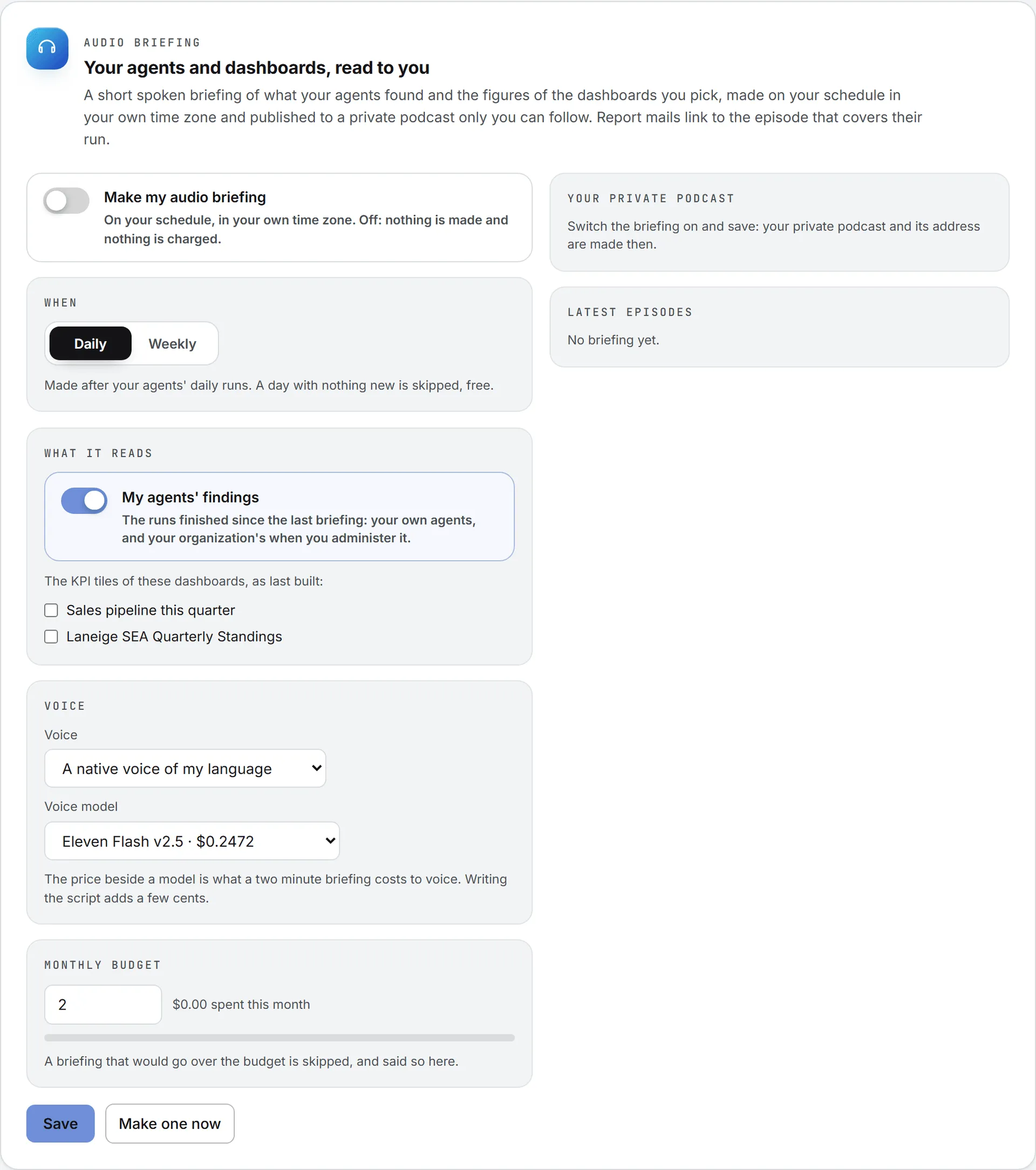
What it reads
- My agents’ findings: the runs finished since your last briefing. That’s your own agents, and your organization’s agents too when you administer it, only on the brands you may see.
- Dashboards: tick the dashboards whose KPI tiles you want read out. They’re read as last built: the briefing never rebuilds a dashboard.
A text model writes the script in your own interface language: a greeting and the date, the critical and warning findings first, then the figures, then what deserves your attention today. It says only what the data says.
When it is made
Daily, or Weekly on the day you pick, in the time zone of your settings. It’s made after your agents’ daily runs. A day with nothing new, no run and no dashboard rebuilt, is skipped and costs nothing. Make one now makes one at once, whatever the schedule, from what happened since the last one (the last seven days for a first one).
The voice
Pick a Voice and a Voice model. The Voice list opens on A native voice of my language, the default: the briefing is written in your language and read by a native speaker of it. Below it come the native speakers of your language, to pick one by name, then the voices that speak it with an accent. The models your organization allows are listed, the cheapest first, with what a two minute briefing costs to voice. Eleven Flash, the cheapest, is the default.
What it costs
Writing the script and voicing it are billed to you like any AI work, and each episode shows its price. Set a Monthly budget (2 US dollars by default): the gauge shows what this calendar month has cost so far, and a briefing that would go over the budget is skipped. The card says why under the buttons.
Your private podcast
The card shows your podcast’s address with a Copy button. That address is the only key to your briefings, so keep it to yourself. Give it a new address turns the old one off at once; follow the new one again in your app.
To follow it:
- Apple Podcasts (iPhone, iPad, Mac): Library, then the menu at the top, then Follow a Show by URL. Paste the address.
- Overcast: the plus button, then Add URL. Paste the address.
- Pocket Casts: Discover, paste the address in the search field, then Subscribe.
Any other app that takes a podcast by its RSS address works the same way. The latest episodes are also listed on the card, each with its player.
Listen from a report email
A scheduled run’s email to you alone carries Listen to this report (MP3) when your briefing covers that run. See run emails.
Who can do this
Everyone who can open the Agents area has a briefing of their own. The episodes are also kept in your Assets Library, private to you.